Photo Lock

Photo Lock Summary
Photo Lock is a ad-supported, with in-app purchases Android app in Tools by CloudMind. Released in Jun 2020 (6 years ago). It has about 13M+ installs and 48.1K ratings with a 4.17★ (good) average. Based on AppGoblin estimates, it reaches roughly 1.4M monthly active users and generates around $50K+ monthly revenue (54% IAP / 46% ads). Store metadata: updated Jun 1, 2026.
Recent activity: 21.4K installs this week (78.6K over 4 weeks) showing steady growth , and 136 new ratings this week View trends →
Data tracking: SDKs and third-party integrations were last analyzed on Apr 7, 2025.
Store info: Last updated on Google Play on Jun 1, 2026 .
SDKs, Trackers & Permissions
Photo Lock was last scanned for SDKs 2025-04-07. Below is the overview of third party companies detected in the app. The full list of raw SDKs, app permissions and unknown SDKs is available here.
AppGoblin saw Photo Lock uses 8 Development Tools
 Airbnb Engineering
 Google
 Square
AppGoblin saw Photo Lock uses 13 Ad Networks
 Smaato
 PubNative
 InMobi
AppGoblin saw Photo Lock uses 1 Mediation
 AppLovin
AppGoblin saw Photo Lock uses 1 Analytics: Product
 Firebase
AppGoblin saw Photo Lock uses 1 Business Tools
App Details
App Store
Ads & App-Ads.txt
AppGoblin SDK Scans
4.17★
Ratings: 48.1K
Screenshots


App Description
Lock apps, photos and videos. Keep privacy safe.
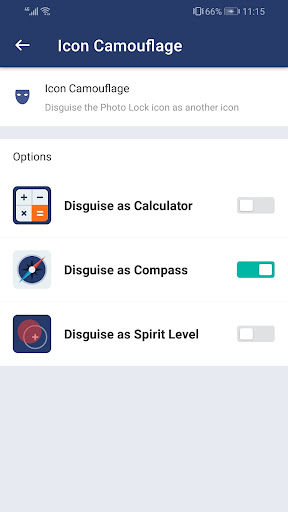
Photo Lock is a photo vault to lock your apps, private photos and videos, with password, pattern lock. If you want to lock some apps, pictures and videos safe, Photo Lock will be a trustable tool. In order to get more safety, you can disguise the Photo Lock icon as another icon, such as calculator or compass, so nobody can find it.
Photo Lock can lock Facebook, WhatsApp, Gallery, Messenger, Snapchat, Instagram, SMS, Contacts, Gmail, Settings, incoming calls and any app you choose. Prevent unauthorized access and guard privacy. Ensure security.
After moving photos and videos to Photo Lock, they can only be viewed by you. All files can be saved in the cloud and sync between different devices.
With Photo Lock, you will never worry about:
someone reads private data in your apps again!
the families check your photos and find your secret!
the children delete important photos by mistake!
friends or colleagues see the private pictures while borrowing the phone!
the privacy risk during the phone repair!
---Feature---
Lock apps with password, pattern lock. If your phone supports fingerprint verification and the version is Android 6.0 or above, you can enable fingerprint in the Photo Lock.
Lock photos
Lock videos
Set album cover
Random keyboard
Take a photo of intruders
Change theme
Disguise the Photo Lock icon as another icon
Power saving mode
To enable the power saving mode, please turn on the Accessibility Service. Once enabled, Photo Lock can monitor foreground app changes in real time, to improve locking and unlocking efficiency, reduce battery consumption, and ensure the stable operation of Photo Lock.
Why does Photo Lock need this permission?
We've received a lot of user feedback complaining that the lock fails after the phone restarts and their apps lose protection. This issue mainly stems from the delay in detecting changes in foreground apps. With Accessibility services enabled, Photo Lock will be informed when any app is opened and provide instant protection for locked apps, and reducing battery consumption.
What data we will collect and how to use?
Photo Lock doesn’t use Accessibility Service to collect any data. We only use it to monitor foreground apps.
More features are coming. Welcome to send us feedback or leave a comment.
Email: support@domobile.com