Digital To Printable

Digital To Printable Summary
Digital To Printable is a with in-app purchases Android app in Education by NISHANT KUMAR. Released in Aug 2025 (7 months ago). It has about 16.1K+ installs Based on AppGoblin estimates, it reaches roughly 2.1K monthly active users and generates around $<10K monthly revenue (100% IAP / 0% ads). Store metadata: updated Feb 6, 2026.
Recent activity: 1.1K installs this week (4.2K over 4 weeks) showing steady growth View trends →
Store info: Last updated on Google Play on Feb 6, 2026 .
0★
Ratings: 0
Screenshots


App Description
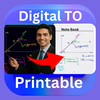
Convert smart-board notes to printer-friendly white pages & combine 4 into 1.
Tired of wasting ink printing dark, smart-board class notes? Digital To Printable transforms your PDFs on-device: it removes black backgrounds and turns them into crisp, white-background pages—perfect for clear, low-ink prints. Plus, save paper by arranging four class-note pages onto a single A4 sheet.
★ Core Features
Smart-Board Background Removal
Automatically detect and convert dark or colored slides into clean, white pages for hassle-free printing.
4-in-1A4 page,
2-in-1A4 page,
3-in-1A4 page,
6-in-1A4 page,
8-in-1A4 page,
10-in-1A4page
Layouts
Fit four separate notes pages into one A4 page—ideal for compact handouts and study guides.
On-Device Processing
All conversion and layout happen locally; your files never leave your phone.
Selective File Access
Uses Android’s Storage Access Framework so the app only sees files you explicitly choose—no broad storage permissions.
Conversion History
Quickly access your recent conversions to reprint or share without reprocessing.
★ How It Works
Select PDF: Tap “Open” and pick your class-note PDF via the system file picker.
Mode Selection: After picking your PDF, choose Black & White or Color mode, then tap Build to process.
Auto-Save & Share: Converted PDFs are automatically saved on your device, with instant Share and Open options.
★ Subscription & Privacy
12-Month Access: One-time purchase via Google Play, valid for a full year.
Manual Renewal: No auto-renewal—renew only when you choose.
No Uploads: We never upload or store your files on our server.
Get perfect, printer-ready class notes in seconds—download Digital To Printable now!