Information Tiles - Watch Face
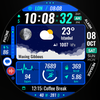

Information Tiles - Watch Face Summary
Information Tiles - Watch Face is a mobile Android app in Personalization by EK Watch Faces™. Released in Nov 2022 (3 years ago). It has about 1.8K+ installs and 45 ratings with a 4.86★ (excellent) average. Based on AppGoblin estimates, it reaches roughly 32 monthly active users . Store metadata: updated Jul 26, 2025.
Recent activity: 10 installs this week (35 over 4 weeks) showing below average growth View trends →
Store info: Last updated on Google Play on Jul 26, 2025 .
4.86★
Ratings: 45
Screenshots


App Description
Look at your watch, plan your life..
🌟 Built for Wear OS
[ Only for Wear OS devices - API 33+ ]
📌 INSTALLATION NOTES:
1 - 🔗 Ensure your watch is properly connected to your phone. Open the Phone App on your phone and tap on "DOWNLOAD TO THE WATCH", then follow the instructions on your watch.
⌛ A few minutes after tapping the install button on your watch, the watch face will be installed. You can then select your new watch face!
📱 The phone app serves as a placeholder to make it easier to install and find the watch face on your Wear OS device.
⚠️ Note: If you find yourself stuck in a payment loop, don’t worry! You will only be charged once, even if prompted to pay again. Wait 5 minutes or restart your watch and try again. This could be a synchronization issue between your device and Google servers.
2 - 💻 Alternatively, you can try installing the watch face from a web browser on your PC.
⚠️ Please note that any issues on this side are NOT developer-dependent. The developer has no control over the Play Store from this side. Thank you.
👀 Look at your watch, plan your life..
FEATURES
● 🎨 15 colours variants
● 🌕 Live moon phases with description
● 🕒 12/24 H (Based on your phone time setting)
● 🚧 Km/Mil supported (Automatically selected based on phone language (in United States and United Kingdom))
● 📊 Steps - Calories - Battery - Next Event - Heart rate (On wrist) - Calendar - 2 custom complications - 5 shortcuts - Days in year - Week in year - Dual time
● 🔔 Unread notification count
● 👀 Always on display supported
🔑 For full functionality, please manually enable Sensors & receive complication data permissions!
WEB
https://www.ekwatchfaces.com
INSTAGRAM
https://www.instagram.com/ekwatchfaces
FACEBOOK
https://www.facebook.com/ekwatchfaces
TWITTER
https://twitter.com/ekwatchfaces
PINTEREST
https://www.pinterest.com/ekwatchfaces
YOUTUBE
https://bit.ly/2TowlDE