Holy Quran (16 Lines per page)


Holy Quran (16 Lines per page) Summary
Holy Quran (16 Lines per page) is a ad-supported Android app in Books And Reference by Fanzetech. Released in Mar 2013 (13 years ago). It has about 8.2M+ installs and 66.8K ratings with a 4.60★ (excellent) average. Based on AppGoblin estimates, it reaches roughly 287K monthly active users and generates around $10K+ monthly revenue (0% IAP / 100% ads). Store metadata: updated Feb 12, 2026, version 32.
Recent activity: 12.2K installs this week (43.8K over 4 weeks) showing below average growth , and 12 new ratings this week View trends →
Data tracking: SDKs and third-party integrations were last analyzed on Apr 30, 2026.
Store info: Last updated on Google Play on Feb 12, 2026 (version 32).
SDKs, Trackers & Permissions
Holy Quran (16 Lines per page) was last scanned for SDKs 2026-04-30. Below is the overview of third party companies detected in the app. The full list of raw SDKs, app permissions and unknown SDKs is available here.
AppGoblin saw Holy Quran (16 Lines per page) uses 1 Ad Networks
 Google
AppGoblin saw Holy Quran (16 Lines per page) uses 1 Mediation
 AdMob
AdMobAppGoblin saw Holy Quran (16 Lines per page) uses 2 Analytics: Product
 Firebase
 Google Analytics
AppGoblin saw Holy Quran (16 Lines per page) uses 1 Development Tools
App Details
App Store
Ads & App-Ads.txt
AppGoblin SDK Scans
4.6★
Ratings: 66.8K
Screenshots



App Description
Special 16 line Holy Quran with feeling of real Quran in your hand.
This special edition has a specific standard format of sixteen lines per page. 16 Line Holy Quran is specially designed for Hafiz-e-Quran, Muslims who completely memorize Quran in madrasa, school or other religious institution.
Enhance your recitation and spiritual experience with the real feel of actual printed Quran anytime anywhere. Holy Quran has a real page turning effect, elegant style, smooth Nastaliq font and different modes for better readability.
Now it comes with bundle of new customization options for giving your eyes extreme comfort while reading.
Easy Navigation
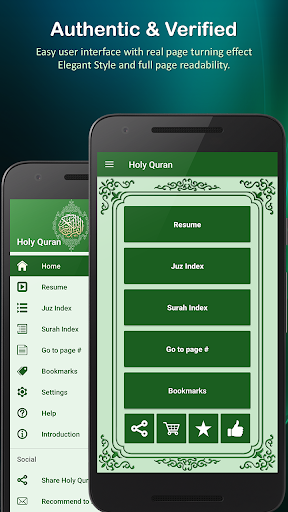
Open any Juz or Surah directly from index. It has all 30 chapters and 114 surahs, long tap to view information about it. Resume option will take you to the page where you left reading last time. With go-to page number option you can jump to a page instantly.
Quick Toolbar
A new toolbar has been added to Holy Quran pages to quickly access useful functions such as save bookmark, night-mode, page sound, page overlay and settings.
Bookmarks
Save your favorite surah or page with unlimited bookmarks. While reading just tap the bookmark icon in quick toolbar to save the current page. If quick toolbar is turned off then you can save the current page by pressing volume-up button. New bookmarks can also be added from bookmarks menu by pressing Plus button.
Brightness controller
Now you can set and adjust custom brightness of pages in app-settings. This app-setting will not affect your phone’s system brightness settings.
Font Colors
You can change font color of pages, whichever you like from given five font colors. It is also really helpful for people with color-blindness problem.
Page Presets
Page preset gives you a totally changed look of Quran pages with beautiful combination of colored background and text. You can choose any preset among given five presets from settings.
Night Mode
It will turn the background black and text into white color which will give you more comfortable reading screen at night or in low light conditions.
Overlay Mode
If your eyes are not comfortable with any color or brightness of pages then page-overlay is for you. It will make a colored overlay as a shield layer in front of pages to protect your eyes from sharpness of colors and brightness. You can set the col