Flight Boarding Pass Wallet

Flight Boarding Pass Wallet Summary
Flight Boarding Pass Wallet is a ad-supported, with in-app purchases Android app in Travel And Local by Studio Bridoux AB. Released in Nov 2018 (7 years ago). It has about 927K+ installs and 10.4K ratings with a 4.60★ (excellent) average. Based on AppGoblin estimates, it reaches roughly 9.7K monthly active users and generates around $<10K monthly revenue (35% IAP / 65% ads). Store metadata: updated Oct 27, 2025, version 146.
Recent activity: 732 installs this week (2.5K over 4 weeks) showing steady growth , and 7.00 new ratings this week View trends →
Data tracking: SDKs and third-party integrations were last analyzed on May 8, 2026. The app's network data flows (API traffic to/from the app and its SDKs) were last crawled on May 31, 2026.
Store info: Last updated on Google Play on Oct 27, 2025 (version 146).
SDKs, Trackers & Permissions
Flight Boarding Pass Wallet was last scanned for SDKs 2026-05-08. Below is the overview of third party companies detected in the app. The full list of raw SDKs, app permissions and unknown SDKs is available here.
AppGoblin saw Flight Boarding Pass Wallet uses 6 Development Tools
 Airbnb Engineering
 ReactiveX
 Kotlin
 Google
AppGoblin saw Flight Boarding Pass Wallet uses 1 Analytics: Product
 Firebase
AppGoblin saw Flight Boarding Pass Wallet uses 1 Business Tools
 JourneyApps
AppGoblin saw Flight Boarding Pass Wallet uses 1 Mediation
 AdMob
AdMobAppGoblin saw Flight Boarding Pass Wallet uses 1 Ad Networks
App Details
App Store
Ads & App-Ads.txt
AppGoblin SDK Scans
4.6★
Ratings: 10.4K
Screenshots


App Description
A Boarding Pass Wallet for Android
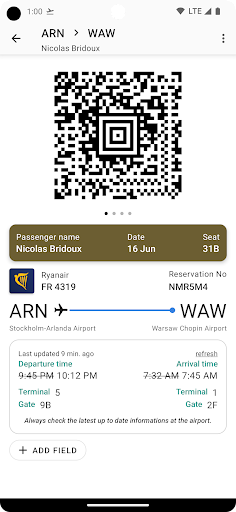
This app is a boarding pass wallet. It allows you to store all your boarding passes in one place and have them easily accessible when traveling. You can see it as a travel companion.
1) Scan your boarding pass to import it.
- You can provide a PDF file (usually what airlines will email you when you check-in online) or a JPEG or PNG file (screenshot) will also work.
- New: You can also scan a physical pass that is issued at the airport for example, import your Boarding Pass in the app and go paperless!
- New: The app now supports .pkpass files, you can "share" them in the app to import your boarding pass or simply click on it to open the pass with it.
- New: The app has now a dark mode to reduce eyestrain and save battery
If you need to manually add a note or some fields in your boarding pass, you can manually do so and add anything to a boarding pass such as "Boarding Group" or "Zone" that are used a Boarding time.
If you import the pass from a passbook file (.pkpass) it will usually contain the boarding time, the gate and maybe the gate closure.
The app supports TSA PreCheck Boarding passes, displaying a TSA Pre Icon in such case.
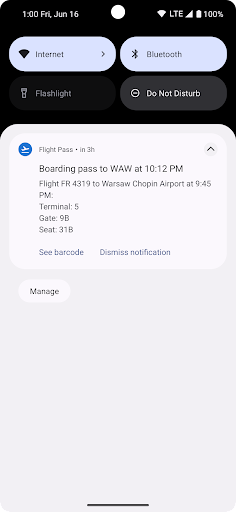
2) You'll get notified when your flight is approaching.
- If available, you'll get the departure terminal and gate so you kow where to head to when arriving at the airport.
- A few hours before your flight departure, you'll get a sticky notification to get direct access to your flight QR-code.
3) Click on the flight notification to see the boarding pass QR code clearly visible to be scanned when boarding.
- The brightness of the screen is adjusted to facilitate the scanning of the QR code.
The app will work offline, all boarding passes are saved locally so no worries if you don't have network when heading to the airport.
The app will delete boarding passes that are more than 2 weeks old automatically.
------------------------------
German 🇩🇪 App and description translated by Joachim Meyn