Flowchart Maker – Diagram


Flowchart Maker – Diagram Summary
Flowchart Maker – Diagram is a mobile Android app in Productivity by Powered by: EMG. Released in Mar 2026 (recently released ago). Store metadata: updated Mar 20, 2026.
Store info: Last updated on Google Play on Mar 20, 2026 .
0★
Ratings: 0
Screenshots



App Description
Create, edit & export professional flowcharts and diagrams with ease.
Flowchart Maker is the most powerful and intuitive diagram tool for Android. Whether you're a student, developer, business analyst, or creative thinker — build stunning flowcharts in minutes, right from your phone or tablet.
★ ZOOMABLE CANVAS
Pan and pinch-to-zoom on an infinite canvas. Work on complex diagrams without feeling cramped.
★ 9 PROFESSIONAL SHAPE TYPES
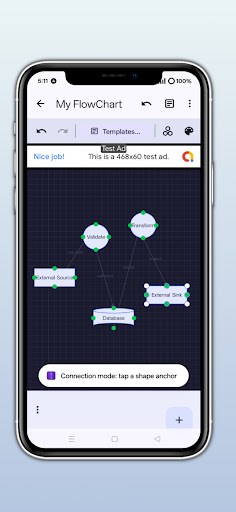
Choose from Process, Decision, Start/End, Data, Document, Connector, Cloud, Database, and Note shapes — covering every standard flowchart symbol.
★ SMART CONNECTIONS
Draw connecting arrows between any two shapes. Connectors automatically adjust when you move shapes around.
★ MULTI-SELECT & GROUP EDITING
Select multiple shapes at once. Move, resize, delete, or align them all in one tap.
★ UNDO / REDO
Made a mistake? Tap undo. Changed your mind? Tap redo. Full command history with no limit.
★ ALIGNMENT & AUTO-LAYOUT
Snap shapes to grid, align edges precisely, or let the auto-layout engine organize your diagram automatically.
★ TEMPLATES
Start fast with built-in templates: Software Flow, Business Process, Decision Tree, Org Chart, and more.
★ STICKY NOTES
Add colour-coded sticky notes anywhere on the canvas to annotate ideas and highlight important steps.
★ MINIMAP
Navigate large diagrams instantly with the always-visible minimap in the corner.
★ VERSION HISTORY & BOOKMARKS
Restore any previous version of your diagram. Bookmark important diagrams for quick access.
★ DARK & LIGHT MODE
Full support for Android dark mode. Looks great in both themes, including Material You dynamic color on Android 12+.
★ PNG & PDF EXPORT
Export your finished diagrams as high-quality PNG images or PDF documents. Share them anywhere.
★ HOME SCREEN WIDGET
Add a quick-create shortcut widget to your home screen and jump straight into a new diagram.
★ HAPTIC FEEDBACK
Feel subtle vibrations when connecting shapes, making the editing experience feel tactile and responsive.
★ DASHBOARD WITH FOLDERS, TAGS & SEARCH
Organize all your diagrams in folders. Tag, star, and search across everything. Never lose a diagram again.
★ FULL OFFLINE SUPPORT
All your diagrams are saved securely on your device. No account required. No internet needed for editing.
─────────────────────────────────────────
PRO UPGRADE — REMOVE ADS
─────────────────────────────────────────
Enjoy a completely ad-free experience with a one-time purchase. No subscriptions, no hidden fees — pay once and get it forever.
─────────────────────────────────────────
PRIVACY FIRST
─────────────────────────────────────────
Your diagrams never leave your device. No sign-up, no cloud, no tracking of your content. We believe your work is yours.
Download Flowchart Maker today and bring your ideas to life.
─────────────────────────────────────────
Contact & Support: toolsappdang@gmail.com