Quick access to image


Quick access to image Summary
Quick access to image is a mobile Android app in Tools by FSA – Simple Apps. Released in Mar 2019 (7 years ago). It has about 3.7K+ installs and 36 ratings with a 3.82★ (average) average. Based on AppGoblin estimates, it reaches roughly 130 monthly active users . Store last updated Oct 26, 2023
Recent activity: 1.00 installs this week (9.00 over 4 weeks) showing steady growth View trends →
Quick access to image SDKs Summary
App not yet scanned for SDKs.
3.82★
Ratings: 36
Screenshots



App Description
Create shortcut for image on home screen or notification bar and open it quickly
The application allows you to quickly open the required images whenever you need it.
Ways to quickly access an image
• Create a shortcut to an image on your home screen - this is suitable, for example, for photos of documents that you often need, or for photos of your loved ones.
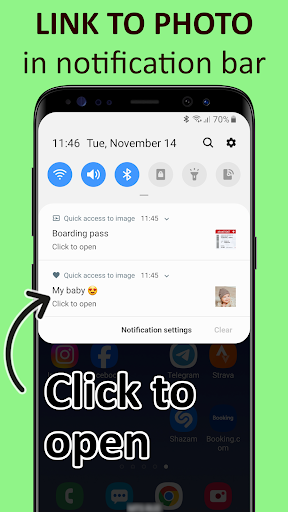
• Create a link to any image in the notification bar and then open it with one click - this is convenient for temporarily needed images, such as a barcode for a transport or museum ticket.
• Save a selected image on the lock screen for as long as you need it and view it without unlocking your phone - useful for viewing a photo of your shopping list.
📃 How to use – picture in the notification bar 📃
1. Open the Quick access to an image application.
2. Select an image using your camera or gallery.
3. Click the "Send to notification bar" button
Now there is a link to your image in the notification bar and you can open your image at any time.
You can send as many images as you like to the notification bar.
📃 Alternative way – image on the locked screen 📃
1. Open the Quick access to an image application.
2. Select an image using your camera or gallery.
3. Click the "Fix on lock screen" button
4. You can lock the screen by pressing the power button. The next time you press the power button, your image will be on the screen. And no need to enter an unlock code. 🔥
Access to the image on the locked screen is sometimes necessary when we need to see some information from time to time.
In the supermarket, it is convenient to view the shopping list on your phone if you do not need to unlock it every time. 🤷
The application Quick access to an image was created to help in such situations. You won't have access to anything other than the selected image until you unlock your phone.
👍 Features 👍
• Choosing image from gallery
• Taking photo
• Send an image to the notification bar so you can open it at any time
• Sending any image to the locked screen so you don't need to enter the unlock key to see the chosen image.
You will enjoy it!
🦸 Free Simple Apps 🦸
Our goal is to create simple and usable applications helping the people around.
Join the Facebook community to find tips, comments and latest news: https://fb.com/free