Future Document


Future Document Summary
Future Document is a mobile Android app in Business by FUTURE TECH WORKS YAZILIM A.S.. Released in Feb 2026 (2 months ago). Store metadata: updated Feb 15, 2026.
Store info: Last updated on Google Play on Feb 15, 2026 .
0★
Ratings:
Screenshots

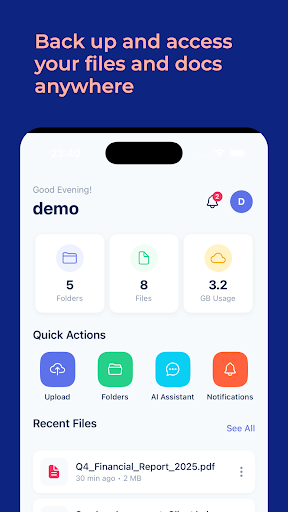


App Description
Enterprise Cloud File Management Software
Future Document is a secure enterprise cloud file management platform designed for businesses that demand top-tier document security, intelligent processing, and seamless collaboration.
SECURE DOCUMENT MANAGEMENT
• Upload, organize, and manage documents in cloud-based folders
• Support for PDF, DOCX, XLSX, PPTX, JPG, PNG, TIFF, and more
• File versioning with full version history and one-tap restore
• Secure file sharing with granular permissions (view, edit, download) and optional time limits
• Up to 5 GB per file upload
AI-POWERED DOCUMENT INTELLIGENCE
• Built-in AI Document Assistant — ask questions and get answers sourced directly from your uploaded files
• OCR (Optical Character Recognition) with confidence scoring and human-in-the-loop approval
• Automatic PII/DLP detection to protect sensitive data like national IDs and IBANs
• Smart document classification and tagging
POWERFUL SEARCH
• Full-text search across all your documents
• Advanced filters by file type, status, and folder
• Instant results with file previews
ENTERPRISE-GRADE SECURITY
• License-based activation with 25-character serial codes
• Biometric authentication (Face ID / Touch ID)
• Jailbreak and root detection with security warnings
• Remote wipe capability for lost or compromised devices
• Suspicious login detection
• End-to-end secure storage with encryption
ADMIN & COMPLIANCE
• Admin panel with quota monitoring and usage analytics
• Audit logs for compliance tracking
• Monthly operation quotas with burst capacity
• Concurrent user management (20 users per license)
• AI token usage tracking
COLLABORATION & SHARING
• Share files with team members via email
• Permission levels: View, Edit, Download
• Time-limited sharing links
• Real-time notifications for shares, OCR results, and quota alerts
MULTILINGUAL SUPPORT
• Full English and Arabic language support
• RTL (right-to-left) layout for Arabic users
DESIGNED FOR ALL DEVICES
• Optimized for both iPhone and iPad
• Responsive tablet layout with adaptive content sizing
• Portrait orientation with a clean, modern interface
ADDITIONAL FEATURES
• In-app file preview for PDFs, images, and documents
• Dark mode support
• Offline mode with pending sync indicators
• Guest access for exploring the app before activation
• Built-in Terms of Service and Privacy Policy
Future Document is built by Future Tech Works Software Company. Activate your license to unlock the full enterprise experience.
For support: info@futuredocument.com