SureLock Kiosk Lockdown

SureLock Kiosk Lockdown Summary
SureLock Kiosk Lockdown is a with in-app purchases Android app in Business by 42Gears Mobility Systems. Released in Dec 2011 (14 years ago). It has about 655.9K+ installs and 2.1K ratings with a 4.13★ (good) average. Based on AppGoblin estimates, it reaches roughly 11.6K monthly active users and generates around $<10K monthly revenue (100% IAP / 0% ads). Store metadata: updated May 25, 2026, version 44012.
Recent activity: 391 installs this week (2.2K over 4 weeks) showing steady growth , and -1 new ratings this week View trends →
Data tracking: SDKs and third-party integrations were last analyzed on May 18, 2026. The app's network data flows (API traffic to/from the app and its SDKs) were last crawled on Oct 3, 2025.
Store info: Last updated on Google Play on May 25, 2026 (version 44012).
SDKs, Trackers & Permissions
SureLock Kiosk Lockdown was last scanned for SDKs 2026-05-18. Below is the overview of third party companies detected in the app. The full list of raw SDKs, app permissions and unknown SDKs is available here.
AppGoblin saw SureLock Kiosk Lockdown uses 8 Development Tools
 Kotlin
 Google
 Microsoft
 Eclipse
AppGoblin saw SureLock Kiosk Lockdown uses 1 Ad Networks
AppGoblin saw SureLock Kiosk Lockdown uses 1 Business Tools
 JourneyApps
AppGoblin saw SureLock Kiosk Lockdown uses 1 Analytics: Product
 Firebase
App Details
App Store
Ads & App-Ads.txt
AppGoblin SDK Scans
4.13★
Ratings: 2.1K
Screenshots


App Description
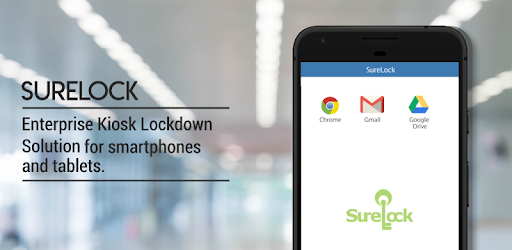
Enterprise Kiosk Lockdown Tool. Turn Android devices into dedicated kiosks.
Important:
Note:
1. For Business use only.
2. Free trial limitations: You can restrict users to single-app mode or 2 apps, and the default wallpaper and password cannot be changed.
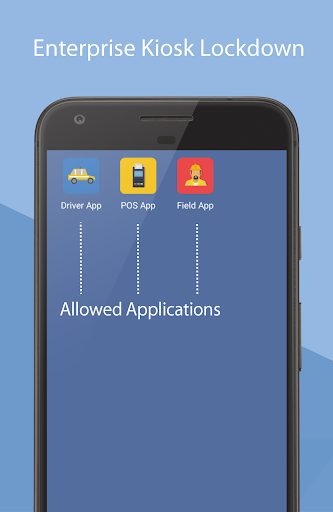
SureLock is the #1 kiosk lockdown tool for Android that transforms any Android tablet or smartphone into a dedicated Android kiosk. It replaces the default Home Screen or Launcher and restricts access to only admin-approved apps. SureLock has built-in device management capabilities.
Description:
Worried about the misuse of your company-owned Android devices? It has become common to use off-the-shelf mobile devices to run business apps or self-service kiosks. However, device misuse can impact user productivity and result in high maintenance costs and mobile data-usage bills.
Use SureLock to lock-down Android tablets and smartphones and convert them into dedicated Android kiosks, limiting access to just the apps and device features that admins approve. Social media apps, system settings, and other unapproved apps are entirely hidden from the user.
Remote Management:
SureLock includes integrated device management functionality with which you can remotely configure lockdown settings, view, push, pull and manage files, troubleshoot device issues using screen-sharing features and track devices in real-time on Google Maps.
Key Features:
Lock down devices into single-app or multi-app mode
Password protect apps
Auto-launch apps at startup
Control peripherals (Wi-Fi, Bluetooth, Camera, Screen Orientation, Airplane Mode, Audio, GPS)
Customize Home screen (Layout, App Labels, Wallpaper)
Remotely manage device and device files with SureMDM
Block user from altering system settings
Set the device to return to Home screen after a period of inactivity
Display widgets on the Home screen
Application shortcuts
Screen saver mode
Disable the status bar, notification panel, and power button
Delayed application launch
Driver Safety Mode: Disable touch screen and hardware keys if the driver goes above a speed threshold
Collect application usage data (launch time, duration of usage, etc.)
Power saving settings (brightness control based on charging status and user inactivity)
Easily integrates SureFox (Special lock-down browser to restrict browsing to only admin-approved websites)
Who uses SureLock
- Field force using Android tablets and smartphones
- Trucking companies (ELD Mandate), Electronic Logbook Application lockdown
- Libraries and schools
- Taxi Dispatch Systems
- Android kiosks at retail stores
- Inventory Control and Asset Tracking
- Passenger Infotainment at airports
- Restaurants for customer feedback and engagement
- Patient surveys at hospitals
- Electronic Proof of Delivery applications used by logistics companies
Licensing and Support:
SureLock In-App license purchase includes support and access to upgrades to the newest versions for 1 year from the date of purchase. After 1 year, you will have perpetual access to the version installed at that time. However, you will not have access to support, maintenance, or upgrades.
Important Links:
How to exit SureLock: https://bit.ly/3dg0ajK
Documentation: https://bit.ly/32dfhnw
Email: techsupport@42gears.com
Note :
1. The user must grant multiple special permissions. During setup, permission usage and consent will be displayed.
2. SureLock uses the Device Administrator permission. It also uses Accessibility services to control the device remotely. This allows admins to securely connect to your device and remotely troubleshoot any issues you may be experiencing.
3. VPN service is needed to enforce the blocking of WiFi and Mobile Data for a specific application as defined by the enterprise IT administrator.