Restaurant Order-Taking App


Restaurant Order-Taking App Summary
Restaurant Order-Taking App is a mobile Android app in Food And Drink by GlobalFood - an Oracle company. Released in Aug 2021 (4 years ago). It has about 116.4K+ installs and 530 ratings with a 3.78★ (average) average. Based on AppGoblin estimates, it reaches roughly 3K monthly active users . Store metadata: updated Oct 31, 2025, version 1183.
Recent activity: 246 installs this week (955 over 4 weeks) showing below average growth View trends →
Data tracking: SDKs and third-party integrations were last analyzed on Mar 15, 2026. The app's network data flows (API traffic to/from the app and its SDKs) were last crawled on Mar 29, 2026.
Store info: Last updated on Google Play on Oct 31, 2025 (version 1183).
SDKs, Trackers & Permissions
Restaurant Order-Taking App was last scanned for SDKs 2026-03-15. Below is the overview of third party companies detected in the app. The full list of raw SDKs, app permissions and unknown SDKs is available here.
AppGoblin saw Restaurant Order-Taking App uses 3 Development Tools
 Kotlin
 Google
 ReactiveX
AppGoblin saw Restaurant Order-Taking App uses 1 Analytics: Attribution
 Branch
AppGoblin saw Restaurant Order-Taking App uses 1 Analytics: Product
 Firebase
AppGoblin saw Restaurant Order-Taking App uses 1 Ad Networks
App Details
App Store
Ads & App-Ads.txt
AppGoblin SDK Scans
3.78★
Ratings: 530
Screenshots


App Description
This app allows restaurants to take online orders and reservations.
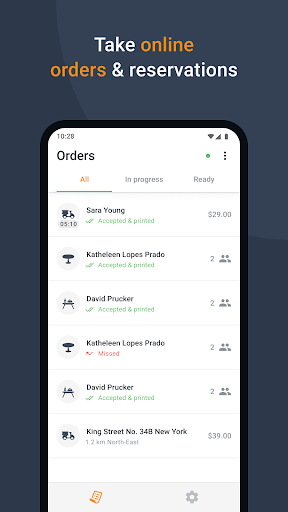
Take online orders from your website, Facebook page or branded app, directly on your smartphone or tablet. Each order placed is instantly pushed to your device, so you can easily review and confirm it.
**Your restaurant account**
To be able to use this app you need to login with your given restaurant’s username and password. Use the credentials obtained from your local partner or get them yourself from the admin area of your restaurant account.
If you don’t have an account yet, please contact your local partner or use the developer contact details below to get connected with the nearest relevant partner.
**How it works**
After setting up your restaurant profile and online menu, place the “See Menu & Order” button on your website. This way your clients can start ordering. Each order placed is directly pushed to this app. Your device rings, notifying you that there’s a new order.
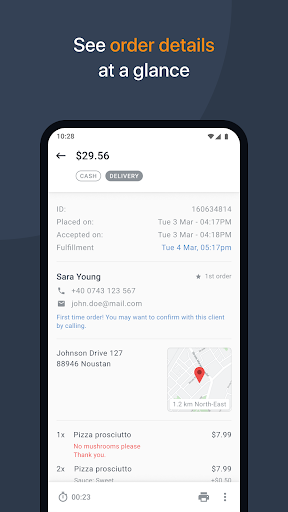
Tap on the order and you can see all its details, from client’s contact information to payment method, ordered items and special instructions.
When you accept an asap order you are required to enter how long it will take to fulfill it. Your client will be notified immediately that the order has been accepted, together with the estimated time for pickup/delivery.
**With this app you can:**
*Receive orders (pickup/delivery/dine-in) and table reservations on your smartphone or tablet;
*View client details: name, phone, email, delivery address;
*View order details: items, quantity, price, payment method, special instructions;
*Accept/Reject new orders (confirmation is then sent to your client in an email);
*Manage your orders with 3 views: all, in progress, ready;
*Mark an order as ready with a simple swipe;
*Print orders automatically or on demand, on supported thermal printers.