Control Panel


Control Panel Summary
Control Panel is a free, ad-supported Android app in Personalization by GOO Mobile. Released in Dec 2024 (1 year ago). Store last updated Aug 11, 2025
Advertising: AppGoblin detected 1.00 monetized ad creatives shown inside the app.
SDK intelligence: AppGoblin detected 4 development tools(e.g. Google), 1 ad networks, 1 mediation,and 1 analytics: product integrated into Control Panel. View full SDK list →
Data tracking: The app's network data flows (API traffic to/from the app and its SDKs) were last crawled on Oct 15, 2025.
Control Panel SDKs Summary
Control Panel was last scanned for SDKs on 2025-08-22. Below is the overview of third-party companies detected in the app. The full list of SDKs, permissions and unknowns is available here.
 Google
 Square
 Airbnb Engineering
 Bumptech
 AdMob
AdMob Firebase
0★
Ratings:
Screenshots


App Description
Customize your Android tools with Smart Control Panel: fast, clean, powerful.
Transform your device experience with the Smart Control Panel App!
Explore a new level of convenience and customization with Smart Control Panel, built to help you access essential tools quickly and manage your Android device with ease. Designed for simplicity and speed, this app puts your favorite shortcuts and settings right at your fingertips.
🌟 Highlighted Features: 🌟
✔️ Sound & Brightness Control: Effortlessly adjust brightness and sound using sliders — ideal for any environment.
✔️ Dark Mode Toggle: Instantly switch between light and dark modes for visual comfort and reduced eye strain.
✔️ Wi-Fi & Bluetooth Management: Toggle Wi-Fi and Bluetooth or connect to devices in just a few taps.
✔️ Do Not Disturb Mode: Silence alerts and calls when you need to focus or relax.
✔️ Screen Rotation Lock: Lock orientation to prevent unwanted screen rotation.
✔️ Airplane Mode: Disable all wireless connections with a single tap.
✔️ Flashlight & Screen Tools: Use the flashlight or take screenshots and screen recordings instantly.
Personalize Your Smart Control Panel
Design your quick panel your way:
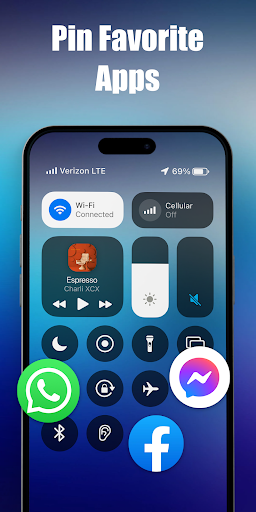
Add Your Favorite Shortcuts: Launch your favorite apps and tools like music, messaging, and more with one tap.
Tailor the Layout: Adjust size, transparency, and arrangement to suit your preferences.
Icon & Color Customization: Choose colors and icon styles to reflect your style.
Boost Your Productivity and Accessibility
With intuitive design and custom shortcuts, streamline your routine and reduce screen time:
Quick Access to Essential Functions: Reach what matters most instantly.
Enhanced Workflow: Organize tools for faster navigation and minimal effort.
This application uses ACCESSIBILITY SERVICES
To display the smart panel on your Android screen, this app requires accessibility service to be enabled.
Additionally, to use music player controls, adjust volume, or dismiss system dialogs, accessibility permissions are required.
Download Smart Control Panel now and simplify how you control your device!