TV Gamepad: Remote Controller


TV Gamepad: Remote Controller Summary
TV Gamepad: Remote Controller is a mobile Android app in Tools by GoSw Digital Ltd. Released in Mar 2026 (2 months ago). It has about 5.8K+ installs Based on AppGoblin estimates, it reaches roughly 1.4K monthly active users . Store metadata: updated May 29, 2026.
Recent activity: 669 installs this week (2.8K over 4 weeks) showing steady growth View trends →
Store info: Last updated on Google Play on May 29, 2026 .
2.88★
Ratings: 0
Screenshots


App Description
TV Gamepad Virtual Gamepad for Android TV via WiFi connection. Wireless control.
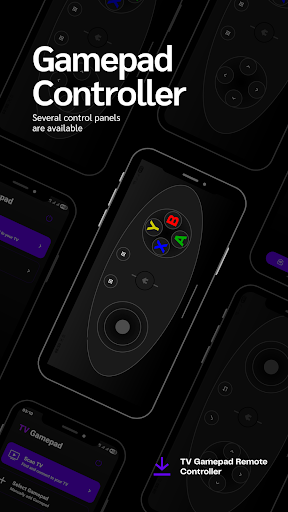
TV Gamepad: Remote Controller lets you use your smartphone as a virtual game controller for Android TV. Designed for a smooth experience, this app allows you to control games directly from your mobile screen with responsive controls.
Whether your physical Remote is missing or you want a simple way to play TV games, our app provides a reliable game controller for TV games that connects via your WiFi network.
Main Features:
• Remote gamepad: Play Android TV games using your phone as a controller.
• Easy Setup: Quickly Connect to Android TV devices using your WiFi network.
• Navigation controls: Full gamepad with joystick and essential buttons like OK, Back, and Volume.
• Multiple Remote: Choose from different remote game-pad themes to suit your gaming style.
• Smart Scanning: Automatically scan for Android TV devices and manage your connected Android TV list.
• Seamless Switching: Switch between devices easily or disconnect from the TV anytime.
Why This App Helps:
• No Hardware Needed: Play Android TV games without buying a physical Remote or an extra TV gamepad.
• Simple & Smooth: Optimized for easy gaming and clear navigation controls on your TV screen.
• Convenient Solution: Perfect when your original TV remote or gamepad is not available.
• Playpad tv Experience: A clean layout designed specifically for Android TV devices.
Use Cases:
• Control game movements with precision using the virtual TV gamepad.
• Use your phone as a secondary Remote gamepad for your favorite games.
• Play Android TV games with a lightweight and portable Playpad tv interface.
How to Use:
• Connect your phone and Android TV to the same WiFi network.
• Open the app and scan for your device.
• Select your game controller for Android TV and start playing!
Enjoy a better way to play TV games with a reliable gamepad remote. Download now and take control of your gaming sessions!