GRBL Nothing Weather 5
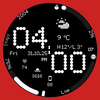

GRBL Nothing Weather 5 Summary
GRBL Nothing Weather 5 is a mobile Android app in Personalization by Grubel. Released in Nov 2025 (7 months ago). It has about 70+ installs Based on AppGoblin estimates, it reaches roughly 2.00 monthly active users . Store metadata: updated Nov 1, 2025.
Store info: Last updated on Google Play on Nov 1, 2025 .
0★
Ratings: 0
Screenshots


App Description
Modern watch face with custom weather icons Designed for Wear OS
Nothing OS Inspired Watch Face for Wear OS
Upgrade your Wear OS smartwatch with a sleek, minimalistic watch face inspired by Nothing OS. Perfectly designed to blend style and functionality, it gives you quick access to time, date, weather, and custom complications.
Why You’ll Love It:
✅ Elegant AM/PM & 12H/24H time formats
✅ 7 fully customizable complications
✅ 11 unique weather icons for instant forecasts
✅ Date adapts automatically to your locale
✅ Always-On Display (AOD) with theme-matching colors
✅ 16 eye-catching themes to match your style
Your watch must be running Android 14 or higher
Quick Tips for Weather Complications:
Update weather manually after installing.
If it doesn’t appear, switch to another watch face and back.
Fahrenheit users: initial sync may show high temperatures; it updates automatically.
Installation Made Simple:
From your Play Store app:
Select your watch from the drop-down menu and install.
Long press your watch screen → swipe left → tap ‘ADD WATCH FACE’ to activate.
From your Play Store website:
Open the watch face listing on your PC/Mac browser.
Click “Install on more devices” → choose your watch.
Long press your watch screen → swipe left → tap ‘ADD WATCH FACE’ to activate.
📹 Samsung Developers video with installation tips: Watch Here
Note:
The companion app opens the Play Store listing only; it does not install the watch face automatically.
For phone battery status on your watch, install the Phone Battery Complication app.
Custom complications may vary by third-party apps.
Need Help?
Email us at grubel.watchfaces@gmail.com