GS Digital 3A Watch Face

GS Digital 3A Watch Face Summary
GS Digital 3A Watch Face is a mobile Android app in Personalization by GS Watchfaces. Released in Nov 2021 (4 years ago). It has about 16.5K+ installs and 110 ratings with a 4.34★ (good) average. Based on AppGoblin estimates, it reaches roughly 237 monthly active users . Store metadata: updated Mar 6, 2025, version 1030.
Recent activity: 51 installs this week (167 over 4 weeks) showing steady growth View trends →
Data tracking: SDKs and third-party integrations were last analyzed on May 12, 2026. The app's network data flows (API traffic to/from the app and its SDKs) were last crawled on Jan 9, 2026.
Store info: Last updated on Google Play on Mar 6, 2025 (version 1030).
GS Digital 3A Watch Face was last scanned for SDKs 2026-05-12. Below is the overview of third party companies detected in the app. The full list of raw SDKs, app permissions and unknown SDKs is available here.
 Kotlin
 Google
 JetBrains IntelliJ
 JetBrains
 Firebase
4.34★
Ratings: 110
Screenshots

App Description
Legacy Digital Wear OS Watch face
🚨 Important Compatibility Note 🚨
This classic design is NOT compatible with newer Wear OS watches (like Galaxy Watch 7 or Pixel Watch 3).
Keep your favorite features! Add our famous live weather, tide charts, and custom data to your new watch with Wear OS Toolset:
https://play.google.com/store/apps/details?id=com.gs.complications.suite
A Digital Watch face for Wear OS smartwatches.
A phone app is needed for this watch face to function properly (intercommunicate with the app below) This app acts as a service so you won't find it in your app launcher. Please make sure to install the mobile version first.
The watch face can be controlled from your phone (a separate application needs to be installed on your phone). This gives you the ability to control all watch face settings, backup and restore customizations, and receive notifications from the watch face when the battery drops to the level you have set, or your heart rate bpm reaches the limit you have set.
Download the Android companion app here https://play.google.com/store/apps/details?id=com.gs.watchfaces
Key features
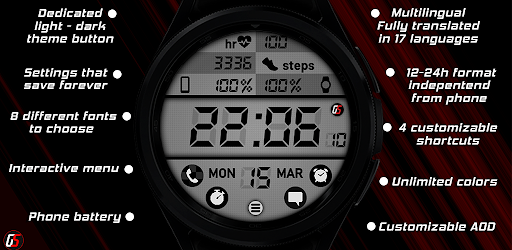
- Customizable AOD
- Dedicated light-dark theme buttons. (You'll find these buttons under the watch face colors settings, W&B and B&W)
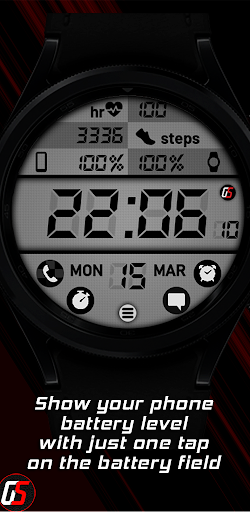
- Phone battery
- Integrated settings menu
- 4 customizable shortcuts (if you see "plus sign" icons, this means that the shortcuts are unset, tapping will allow you to set them and after setting, double tapping will allow you to edit them)
- 12-24h format, independent from the phone
- Multilingual. Fully translated into 17 languages
- 8 different fonts to choose
- Unlimited colors to choose for the watchface elements