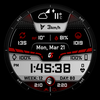
GS Weather 10 Watch Face
ASO Keyword Dashboard
Tracking 119 keywords for GS Weather 10 Watch Face in Google Play

GS Weather 10 Watch Face tracks 119 keywords (no keywords rank yet; 119 need traction). Key metrics: opportunity 70.6, difficulty 46.6.
Premium Wear OS Weather watch face
Tracked keywords
119
0 ranked • 119 not ranking yet
Top 10 coverage
—
Best rank — • Latest leader —
Avg opportunity
70.6
Top keyword: moon
Avg difficulty
46.6
Lower scores indicate easier wins
Opportunity leaders
- 60.8
moon
Opportunity: 74.0 • Difficulty: 39.0 • Rank —
Competitors: 306
- 60.7
screens
Opportunity: 74.0 • Difficulty: 42.5 • Rank —
Competitors: 330
- 59.9
inquiries
Opportunity: 74.0 • Difficulty: 37.9 • Rank —
Competitors: 232
- 60.3
properly
Opportunity: 74.0 • Difficulty: 38.9 • Rank —
Competitors: 301
- 63.5
backup
Opportunity: 74.0 • Difficulty: 52.6 • Rank —
Competitors: 748
Unranked opportunities
moon
Opportunity: 74.0 • Difficulty: 39.0 • Competitors: 306
screens
Opportunity: 74.0 • Difficulty: 42.5 • Competitors: 330
inquiries
Opportunity: 74.0 • Difficulty: 37.9 • Competitors: 232
properly
Opportunity: 74.0 • Difficulty: 38.9 • Competitors: 301
backup
Opportunity: 74.0 • Difficulty: 52.6 • Competitors: 748
High competition keywords
make
Total apps: 326,182 • Major competitors: 20,145
Latest rank: — • Difficulty: 57.5
find
Total apps: 309,306 • Major competitors: 17,804
Latest rank: — • Difficulty: 58.3
mobile
Total apps: 282,229 • Major competitors: 11,184
Latest rank: — • Difficulty: 55.7
features
Total apps: 255,887 • Major competitors: 15,254
Latest rank: — • Difficulty: 58.0
using
Total apps: 221,047 • Major competitors: 12,071
Latest rank: — • Difficulty: 56.7
All tracked keywords
Includes opportunity, difficulty, rankings and competitor benchmarks
| Major Competitors | |||||||
|---|---|---|---|---|---|---|---|
| level | 68 | 100 | 54 | 80 110,874 competing apps Median installs: 2,238 Avg rating: 4.0 | — | — | 7,012 major competitor apps |
| social media | 71 | 100 | 48 | 73 38,633 competing apps Median installs: 3,108 Avg rating: 4.0 | — | — | 2,283 major competitor apps |
| weather | 72 | 100 | 55 | 70 23,811 competing apps Median installs: 3,322 Avg rating: 4.0 | — | — | 1,559 major competitor apps |
| 69 | 100 | 50 | 77 69,714 competing apps Median installs: 2,557 Avg rating: 4.0 | — | — | 3,089 major competitor apps | |
| notifications | 68 | 100 | 54 | 80 99,787 competing apps Median installs: 851 Avg rating: 4.0 | — | — | 3,135 major competitor apps |
| version | 70 | 100 | 54 | 76 57,146 competing apps Median installs: 4,943 Avg rating: 4.0 | — | — | 3,388 major competitor apps |
| make | 65 | 100 | 57 | 88 326,182 competing apps Median installs: 2,543 Avg rating: 4.0 | — | — | 20,145 major competitor apps |
| phone | 67 | 100 | 60 | 83 153,357 competing apps Median installs: 3,571 Avg rating: 4.0 | — | — | 9,542 major competitor apps |
| better | 69 | 100 | 51 | 78 81,932 competing apps Median installs: 2,188 Avg rating: 4.0 | — | — | 4,354 major competitor apps |
| contact | 67 | 100 | 54 | 82 139,265 competing apps Median installs: 1,839 Avg rating: 4.0 | — | — | 6,374 major competitor apps |
| heart | 70 | 100 | 47 | 74 42,949 competing apps Median installs: 1,027 Avg rating: 4.1 | — | — | 1,623 major competitor apps |
| wear | 71 | 100 | 61 | 72 32,797 competing apps Median installs: 382 Avg rating: 4.1 | — | — | 869 major competitor apps |
| wear os | 72 | 100 | 60 | 70 24,439 competing apps Median installs: 294 Avg rating: 4.2 | — | — | 300 major competitor apps |
| moon | 74 | 100 | 39 | 61 6,614 competing apps Median installs: 1,524 Avg rating: 4.2 | — | — | 306 major competitor apps |
| control | 67 | 100 | 54 | 82 137,320 competing apps Median installs: 1,856 Avg rating: 3.8 | — | — | 7,574 major competitor apps |
| needs | 70 | 100 | 48 | 76 57,238 competing apps Median installs: 1,292 Avg rating: 4.0 | — | — | 2,531 major competitor apps |
| using | 66 | 100 | 57 | 85 221,047 competing apps Median installs: 2,913 Avg rating: 3.9 | — | — | 12,071 major competitor apps |
| find | 65 | 100 | 58 | 87 309,306 competing apps Median installs: 2,806 Avg rating: 4.1 | — | — | 17,804 major competitor apps |
| service | 67 | 100 | 54 | 82 134,795 competing apps Median installs: 1,427 Avg rating: 3.9 | — | — | 5,789 major competitor apps |
| mobile | 65 | 100 | 56 | 87 282,229 competing apps Median installs: 1,470 Avg rating: 3.9 | — | — | 11,184 major competitor apps |
| rate | 70 | 100 | 47 | 75 50,571 competing apps Median installs: 3,203 Avg rating: 4.1 | — | — | 2,296 major competitor apps |
| note | 71 | 100 | 48 | 72 32,137 competing apps Median installs: 4,216 Avg rating: 4.1 | — | — | 1,694 major competitor apps |
| launch | 73 | 100 | 47 | 67 16,499 competing apps Median installs: 3,701 Avg rating: 4.0 | — | — | 1,158 major competitor apps |
| install | 70 | 100 | 49 | 76 59,456 competing apps Median installs: 3,203 Avg rating: 4.1 | — | — | 2,861 major competitor apps |
| watch | 68 | 100 | 57 | 80 105,443 competing apps Median installs: 1,232 Avg rating: 4.0 | — | — | 5,798 major competitor apps |
App Description
Premium Wear OS Weather watch face
After installing, please take a moment and launch the quick guide found in the watchface settings menu, to better understand the watchface functions.
The watch face has to be installed on both your phone and watch, to function properly (get phone battery percentage and intercommunicate with the app below). The one on the phone acts as a service so you won't find it in your app launcher. Please make sure to install the mobile version first.
The watch face can be optionally controlled from your phone (a separate application needs to be installed on your phone). This gives you the ability to control all watchface settings, backup and restore customizations, and receive notifications from the watchface when the battery drops to the level you have set, or your heart rate bpm reaches the limit you have set.
Download the Android companion app here https://play.google.com/store/apps/details?id=com.gs.watchfaces
The watch face has 4 main screens on which it shows all the information. The time, weather (chart), sun, and moon screen.
It also has an additional chart showing tides.
Tides are disabled by default, please enable tides from the watch face general settings if you need them.
Check the tap guide and/or quick guide to see how to get to each one of them.
Please take note that the weather info is only "shown" on the watch face, the data is provided by openweathermap.org. I do not have any responsibility for the weather conditions the watch face shows.
Tides info is taken from worldtides.info and as their disclaimer states:
“NO GUARANTEES ARE MADE ABOUT THE CORRECTNESS OF THIS DATA. You may not use it if anyone or anything could come to harm as a result of using it (e.g., for navigational purposes)”.
For any inquiries or problems, you may have, please contact me on social media or send me an email to mailto:support@gswatchfaces.com. I will be more than happy to assist you and hear your thoughts.
