Zip File Maker

Zip File Maker Summary
Zip File Maker is a ad-supported, with in-app purchases Android app in Tools by HARDCODED JOY S.R.L.. Released in Feb 2025 (1 year ago). It has about 7.7K+ installs Based on AppGoblin estimates, it reaches roughly 904 monthly active users and generates around $<10K monthly revenue (67% IAP / 33% ads). Store metadata: updated Feb 23, 2026.
Recent activity: 305 installs this week (1.2K over 4 weeks) showing above average growth View trends →
Store info: Last updated on Google Play on Feb 23, 2026 .
0★
Ratings: 0
Screenshots


App Description
Create zip archive file. Fast and easy.
This app allows you to create zip file containing files and folders that you selected.
Adding files:
• tap "+ file"
• choose the files you want to add to the archive
• the app will copy the files to internal temporary folder
Adding folder:
• tap "+ folder"
• select the folder you want to add to the archive
• the app will copy the folder and its content to internal temporary folder
Creating the zip archive:
• tap "save as"
• enter the desired file name
• the app will create and save the zip file, containing the files and folders that are currently available in the temporary folder
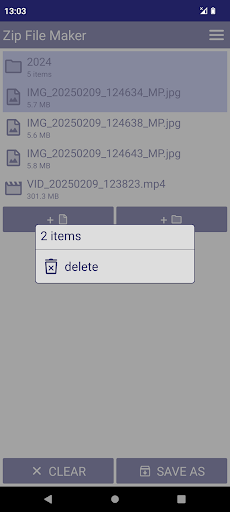
Removing a file:
• long tap on the file name
• choose "delete"
• the app will remove that file from the temporary folder
• the original file in the device storage does not get affected
Clearing the temporary folder:
• tap "clear" -> OK
• the app will remove all the files from the temporary folder
• the storage space occupied by them will be gained back
Reusing the files for new zip archive:
• if user closes the app without removing the files, they will remain in the temporary folder
• user can add more files and create new zip archive.
Free version limitation:
• maximum 50 items in the temporary folder
• contains light, non-intrusive ads
Users can upgrade to Premium Version via in-app purchase (one time payment).
Premium version advantages:
• unlimited items in the temporary folder (as long as the device has enough storage space)
• no ads
• more features will be added if the app gets enough downloads