Droid Dashcam - Video Recorder


Droid Dashcam - Video Recorder Summary
Droid Dashcam - Video Recorder is a ad-supported, with in-app purchases Android app in Auto And Vehicles by DroidCoolApps. Released in Sep 2020 (5 years ago). It has about 2.2M+ installs and 18.7K ratings with a 4.49★ (good) average. Based on AppGoblin estimates, it reaches roughly 84.9K monthly active users and generates around $10K+ monthly revenue (52% IAP / 48% ads). Store metadata: updated Mar 21, 2026, version 334.
Recent activity: 31.3K installs this week (56.1K over 4 weeks) showing exceptional growth , and 75 new ratings this week View trends →
Data tracking: SDKs and third-party integrations were last analyzed on Apr 1, 2026. The app's network data flows (API traffic to/from the app and its SDKs) were last crawled on Jun 16, 2025.
Store info: Last updated on Google Play on Mar 21, 2026 (version 334).
Droid Dashcam - Video Recorder was last scanned for SDKs 2026-04-01. Below is the overview of third party companies detected in the app. The full list of raw SDKs, app permissions and unknown SDKs is available here.
 Google
 Kotlin
 Bumptech
 Firebase
 AdMob
AdMob4.49★
Ratings: 18.7K
Screenshots


App Description
High Performance & Lightweight Video Recorder App with Hardcoded Subtitles
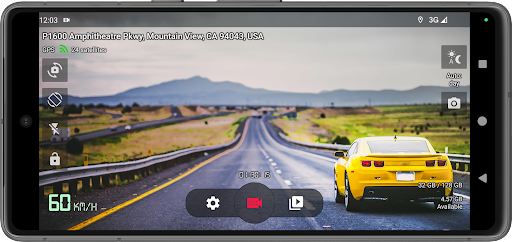
Droid Dashcam is a great driving video recorder (dashboard camera, BlackBox) app for car/vehicle drivers which can continuously record videos in loop mode, add subtitles with needed information directly on those videos (read below) and record in background, autostart recording and much more.
Features:
* Hardcoded (embedded) Subtitles - Overlay Captions directly on Recording Video file:
- Timestamp (Date)
- Location Address
- GPS Coordinates
- Speed (based on GPS data)
- Vehicle registration plate (car number)
* Background Video Recording - you can continue recording in background and use other apps which doesn't use camera. You can also use notification panel to start/stop recording while this app is running in background.
* Loop Recording - auto deleting old video files when there is not enough space for new videos (you can set max space usage for all videos)
* Options for autostarting recording on charging on/off, on system boot, on Bluetooth device connection/disconnection, AUX-cable connection, or on app launch
* Small (Lightweight) app size
* Automatic change of day and night video recording mode
* Landscape and Portrait Orientations for video recording
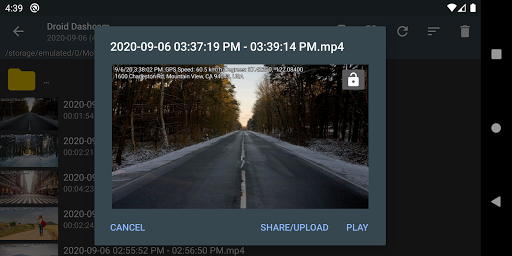
* Share or upload a selected video to various services
* Recording in Shared Movies folder or App owned folders (phone and external SDcard storages) - can be set in the settings
* Lock videos from overwriting (G-shock sensor) on impact detection
* Videos Screen which allows selecting video you want and playing it using any video player app you have, deleting selected videos
* Easy to use, simple UI, the configuration of the buttons displayed on the screen, etc.
* Camera selection - you can use any camera for recording (rear/front) but only some devices allows to choose camera with wide-angle lens
* Taking photos
* Floating window with control buttons on top of all applications
Privacy:
* All your recorded videos will be saved only on your local device. We never make backup copies of your videos (the application doesn't have and doesn't connect to the servers)
FAQ: https://github.com/HelgeApps/droid_dashcam_faq/wiki/en - answers to frequent questions or feature requests like
- Video Stabilization (EIS, Electronic stabilization) is not available in the app
- Multiple cameras / wide lens camera not available in the app
- Battery usage is high, battery drains fast, devic