Ringtone Maker:create ringtone


Ringtone Maker:create ringtone Summary
Ringtone Maker:create ringtone is a ad-supported Android app in Personalization by Big Bang Inc.. Released in Dec 2010 (15 years ago). It has about 101M+ installs and 666K ratings with a 4.63★ (excellent) average. Based on AppGoblin estimates, it reaches roughly 4.1M monthly active users and generates around $200K+ monthly revenue (0% IAP / 100% ads). Store metadata: updated May 6, 2026, version 3100326.
Recent activity: 5.00 installs this week (10 over 4 weeks) showing steady growth , and 426 new ratings this week View trends →
Data tracking: SDKs and third-party integrations were last analyzed on May 20, 2026.
Store info: Last updated on Google Play on May 6, 2026 (version 3100326).
SDKs, Trackers & Permissions
Ringtone Maker:create ringtone was last scanned for SDKs 2026-05-20. Below is the overview of third party companies detected in the app. The full list of raw SDKs, app permissions and unknown SDKs is available here.
 Google
 AdMob
AdMob Firebase
 Kotlin
App Details
App Store
Ads & App-Ads.txt
AppGoblin SDK Scans
4.63★
Ratings: 666K
Screenshots
App Description
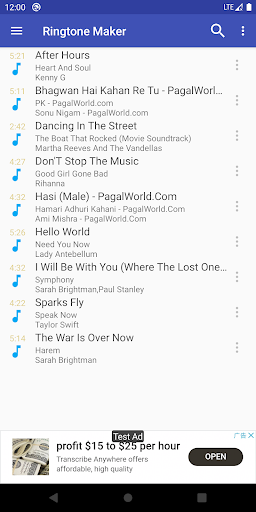
Ringtone Maker is an app to create ringtones from music files or your recording.
Ringtone Maker is free app creates ringtones, alarms, and notifications from MP3, FLAC, OGG, WAV,AAC(M4A)/MP4, 3GPP/AMR, MIDI files. Cut the best part of your audio song and save it as your Ringtone/Alarm/Music File/Notification Tone.
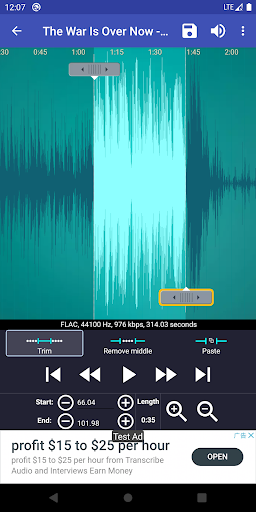
Make your own unique free ringtones is fast and easy. You can set the starting and ending notes by sliding arrows along the timeline, by pressing Start and End to record the point, or by typing in time stamps. This app is also a music editor/alarm tone maker/ ringtone cutter and notification tone creator.
You can also record your own or your kids’ voice, and make them to ringtone or notification. Enjoy reminding you to answer the call with your child's voice.
Features:
Free ringtone and music download.
Copy, cut and paste. (So you can merge different music files together very easily.)
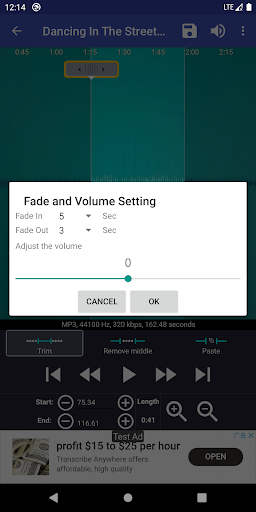
Fade in/out for mp3.
Adjust volume for mp3.
Preview the Ringtone files and assign to contact.
View a scrollable waveform representation of the audio file at 6 zoom levels.
Set starting and ending points for a clip within the audio file, using an touch interface.
Play the selected portion of the audio, including an indicator cursor and auto scrolling of the waveform.
Play anywhere else by tapping the screen.
Save the clipped audio as a new audio file and mark it as Music, Ringtone, Alarm, or Notification.
Record a new audio clip to edit.
Delete audio.
Assign a Ringtone directly to a contact, you can also re-assign or delete the Ringtone from contact.
Sort by Tracks, Albums, Artists.
Manage contact Ringtone.
Default save path, you can change then in setting of "Ringtone Maker":
Ringtone: Internal storage/ringtones
Notification: Internal storage/notifications
Alarm: Internal storage/alarms
Music: Internal storage/music
AD free version:
https://play.google.com/store/apps/details?id=com.herman.ringtone.paid
Music not show:
Android system is very slow to update its music database, so it takes time if you just download your music. You can use "Scan" menu of "Ringtone Maker" to force update.
Google Play Music can't be display, as it's hidden in special way, other app can't access it.
Workaround : You can access Google Music with the Chrome browser on your phone. Select the desktop site. Select your desired song, click on the 3 dots on the right. A window will pop up, giving you options, including download to devic