駐車場・検索 コインパーキングの料金計算と順位表示


駐車場・検索 コインパーキングの料金計算と順位表示 Summary
駐車場・検索 コインパーキングの料金計算と順位表示 is a ad-supported Android app in Maps And Navigation by Hideshi Otsuru. Released in Sep 2013 (12 years ago). It has about 68.5K+ installs Based on AppGoblin estimates, it reaches roughly 3.1K monthly active users and generates around $<10K monthly revenue (0% IAP / 100% ads). Store metadata: updated Apr 2, 2026.
Recent activity: 62 installs this week (269 over 4 weeks) showing below average growth View trends →
Store info: Last updated on Google Play on Apr 2, 2026 .
0★
Ratings: 0
Screenshots


App Description
Search for parking lots from approximately 90,000 results. Simulate the fees and display them on a map in order of cheapest to cheapest.
Approximately 90,000 search results.
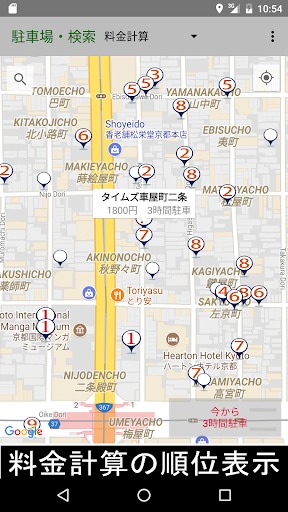
Parking fees are automatically calculated for a specified time period and displayed on a map in order of cheapest to most expensive.
Routes can also be displayed without changing screens. Furthermore, parking availability can be checked at a glance by checking the circle in the top right corner of the icon (blue: vacant / red: full / yellow: crowded).
■ Main Features
● Parking Fee Simulation (Parking Fee Calculation)
Automatically calculate parking fees for a specified time.
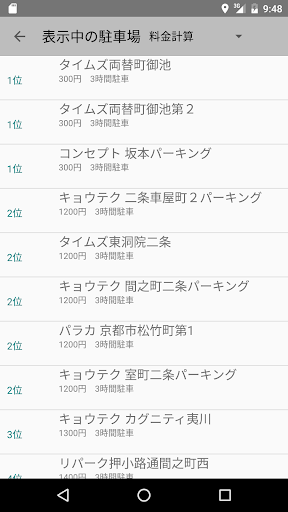
Calculation results are displayed on a map in order of lowest to highest.
"Fee" and "Maximum Fee" can be displayed on the icon.
● Parking List Function
Sort by fee calculation ranking, fee, maximum fee, or distance.
After keyword search, sort by name, address, or distance.
Supports list display by city, ward, town, or village.
● Convenient Features
Bookmark frequently used parking lots.
Display the parking lot's official website within the app.
Route guidance from your current location to the parking lot.
Supports text copying of detailed data.
● Map View Switching
Switch between standard map, aerial photo, terrain, and map + aerial photo.
● Parking Availability Visualization
You can get a real-time grasp of the parking lot situation by displaying the following indicators in the upper right corner of the parking lot icon:
Blue: Empty
Red: Full
Yellow: Congested
■ Notes on Parking Fee Calculation
The parking fee calculation results may differ depending on the parking lot's fee structure.
For accurate fees, please check the "Parking Website" on the details screen.
■ Parking lots searchable: Times, Repark, NTT Le Parc, Showa Park, Navi Park, Space 24, Your Parking, Concept, Anabuki Park, At Park, Apple Park, Izumi Parking, Able Parking, Eco Park, Kyotech, Coin Park, Just Park, Spark, Tama Park, Ticket Park, Techno Parking, Trust Park, Park Japan, Park Net, Paraca, Fruit Park, Break Parking, Living Park, One Park, Daiei Park, Toyo Carmax, SAN Park, Argo Park, The Park, Meitetsu Kyosho, ASAHIPARK, BooBooPARK, D Parking, Eco Park, GS Park, NB Parking, TOMO Parking, and many others.