HUMAX Live TV for Tablet

HUMAX Live TV for Tablet Summary
HUMAX Live TV for Tablet is a mobile Android app in Entertainment by HUMAX Co., Ltd.. Released in Jul 2013 (12 years ago). It has about 355.2K+ installs and 1.2K ratings with a 2.34★ (poor) average. Based on AppGoblin estimates, it reaches roughly 18.2K monthly active users . Store metadata: updated Oct 30, 2018, version 43.
Recent activity: 5.6K installs this week (9.8K over 4 weeks) showing exceptional growth , and -1 new ratings this week View trends →
Data tracking: SDKs and third-party integrations were last analyzed on Mar 29, 2026. The app's network data flows (API traffic to/from the app and its SDKs) were last crawled on Mar 29, 2026.
Store info: Last updated on Google Play on Oct 30, 2018 (version 43).
HUMAX Live TV for Tablet was last scanned for SDKs 2026-03-29. Below is the overview of third party companies detected in the app. The full list of raw SDKs, app permissions and unknown SDKs is available here.
 Bumptech
2.34★
Ratings: 1.2K
Screenshots


App Description
Enjoy LiveTV on your tablet with HUMAX LIVE TV APP.
HUMAX Live TV lets you watch live TV on your smartphone or tablet just as you would as if you were watching TV at home (up to 2 devices simultaneously).
When you have to go out in the middle of watching TV at home, you can continute watching live TV by bringing it in to your tablet.
You can also schedule recordings on your HUMAX product(iCord Evolution & HMS-1000T) while you are away from home with the remote recording features of HUMAX live TV.
----- Features -----
- Live TV: Watch live TV on your Tablet whenever, wherever.
- Send to / Bring in: Bring in live TV from TV to your tablet or send from your tablet to TV. Don’t miss a thing!
- Remote Recording with TV Guide: Scroll through TV guide on your tablet and schedule remote recordings on your HUMAX product remotely.
* You need to register and sign in to ‘myhumax.net’ to use this feature.
----- How to Use -----
1. Pairing
A. Download ‘HUMAX Live TV.’
B. Select ‘START’ to pair your tablet with your HUMAX product.
C. When the PIN code pops-up on the TV screen, enter the PIN code on your tablet.
2. Watching Live TV / Send to / Bring in
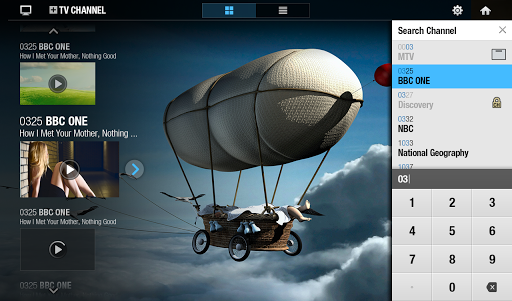
A. Select a channel you want to watch on live TV from the channel list.
B. To switch channels, touch the ‘CH’ button and select a channel you want to switch to.
C. Touch the screen and touch the small TV icon with the arrow pointing upwards to send the programme to your TV screen. Touch the TV icon with the arrow pointing downwards to bring in the programme you are watching on TV to your tablet.
3. Remote Recording with TV Guide
A. Touch the ‘GUIDE’ button on the screen.
B. Scroll through the TV guide and touch the menus to see the programme information or schedule remote recording.
* You need to register and sign in to ‘myhumax.net’ to use this feature.
----- Notice -----
- HUMAX Live TV works on Galaxy Tab 10.0, Galaxy Tab 8.9, Galaxy Note 10.1, and devices that support only 1280x800.
- HUMAX Live TV may not guarantee best performance for all mobile devices.
- The performance of Live TV streaming depends on network environment.
- HUMAX products and your tablet device have to be on the same network.
- Works on 3G/4G and Wi-Fi network
----- Compatibility -----
Requires Android 4.0 and later
Compatible with HUMAX iCord Evolution(HMS-1000S), HMS-1000T
----- Language