Network Cell Info & Wifi

Network Cell Info & Wifi Summary
Network Cell Info & Wifi is a ad-supported Android app in Tools by Navigation & buttons shufflers. Released in Apr 2017 (8 years ago). It has about 52.1K+ installs and 380 ratings with a 3.95★ (average) average. Based on AppGoblin estimates, it reaches roughly 644 monthly active users and generates around $<10K monthly revenue (0% IAP / 100% ads). Store metadata: updated Aug 5, 2024.
Recent activity: 437 installs this week (797 over 4 weeks) showing exceptional growth View trends →
Store info: Last updated on Google Play on Aug 5, 2024 .
3.95★
Ratings: 380
Screenshots



App Description
Network cell info of 3g, 4g lte, 5g - Wifi Signal, System, Battery & CPU info
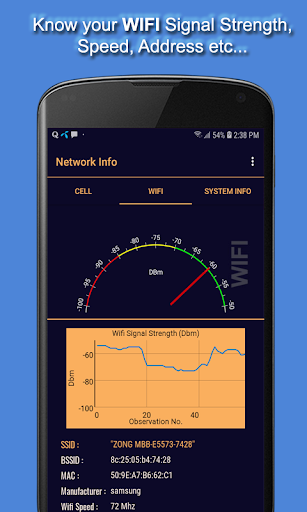
Network Signal Info is a Network Monitoring tool. Using this app you can measure Cell tower Signal Level and Network Operator parameters , Neighbor Cells Signal level. You can also find Neighbor cell Signal Strength level. The Wifi Tab shows all the information regarding Wifi Connectivity including but not limited to SSID, BSSID, Wifi Speed, Frequency and Channel. The Tab System info shows information related to phone hardware including Manufacturer, Brand, IMEI etc. You can also find CPU Speed, number of CPUs, Display Width and Height, and Battery Information.
Features:-
This Network Monitoring App has the following features:
• CELL TOWER INFO: You can check all the Network Operator Parameters including Network Signal Strength level, SIM Operator, Phone number, MNC , MMC , Country Code etc.
•WIFI INFO: Wifi tab shows all Wifi Signal Strength level in a nice speedometer view with other parameters like ssid, bssid, mac, manufacturer, wifi speed, frequency and channel etc.
•SYSTEM INFO: System information like manufacturer, brand, model, IMEI, IMSI, Operating system is shown in System info.
•CPU INFO: Moreover System info also shows information regarding CPU type, frequency, and number of cpu's.
•DISPLAY & BATTERY INFO: Screen Dimensions and Battery info can be checked from SYSTEM Info tab.