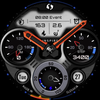
Inspire 17 - Analog Watch Face
ASO Keyword Dashboard
Tracking 135 keywords for Inspire 17 - Analog Watch Face in Google Play

Inspire 17 - Analog Watch Face tracks 135 keywords (no keywords rank yet; 135 need traction). Key metrics: opportunity 70.6, difficulty 47.0.
Analog watchface with sharp graphic many color options and all info you need
Tracked keywords
135
0 ranked • 135 not ranking yet
Top 10 coverage
—
Best rank — • Latest leader —
Avg opportunity
70.6
Top keyword: faces
Avg difficulty
47.0
Lower scores indicate easier wins
Opportunity leaders
- 63.6
faces
Opportunity: 75.0 • Difficulty: 40.5 • Rank —
Competitors: 392
- 62.5
analog
Opportunity: 74.0 • Difficulty: 38.5 • Rank —
Competitors: 190
- 64.3
sharp
Opportunity: 74.0 • Difficulty: 43.9 • Rank —
Competitors: 940
- 65.9
developer
Opportunity: 74.0 • Difficulty: 41.2 • Rank —
Competitors: 582
- 60.4
properly
Opportunity: 74.0 • Difficulty: 38.9 • Rank —
Competitors: 302
Unranked opportunities
faces
Opportunity: 75.0 • Difficulty: 40.5 • Competitors: 392
analog
Opportunity: 74.0 • Difficulty: 38.5 • Competitors: 190
sharp
Opportunity: 74.0 • Difficulty: 43.9 • Competitors: 940
developer
Opportunity: 74.0 • Difficulty: 41.2 • Competitors: 582
properly
Opportunity: 74.0 • Difficulty: 38.9 • Competitors: 302
High competition keywords
time
Total apps: 383,211 • Major competitors: 17,726
Latest rank: — • Difficulty: 57.6
make
Total apps: 326,434 • Major competitors: 20,160
Latest rank: — • Difficulty: 57.7
mobile
Total apps: 281,675 • Major competitors: 11,156
Latest rank: — • Difficulty: 55.7
every
Total apps: 258,407 • Major competitors: 14,422
Latest rank: — • Difficulty: 55.8
best
Total apps: 256,612 • Major competitors: 18,517
Latest rank: — • Difficulty: 57.4
All tracked keywords
Includes opportunity, difficulty, rankings and competitor benchmarks
| Major Competitors | |||||||
|---|---|---|---|---|---|---|---|
| play | 66 | 100 | 60 | 85 208,243 competing apps Median installs: 7,199 Avg rating: 4.0 | — | — | 20,375 major competitor apps |
| best | 66 | 100 | 57 | 86 256,612 competing apps Median installs: 3,975 Avg rating: 4.1 | — | — | 18,517 major competitor apps |
| top | 69 | 100 | 56 | 79 87,703 competing apps Median installs: 3,208 Avg rating: 4.0 | — | — | 6,248 major competitor apps |
| health | 69 | 100 | 49 | 77 69,935 competing apps Median installs: 770 Avg rating: 3.9 | — | — | 1,974 major competitor apps |
| themes | 72 | 100 | 48 | 70 25,876 competing apps Median installs: 8,807 Avg rating: 4.3 | — | — | 2,129 major competitor apps |
| follow | 69 | 100 | 52 | 78 83,303 competing apps Median installs: 1,613 Avg rating: 4.1 | — | — | 4,452 major competitor apps |
| discounts | 72 | 100 | 44 | 69 21,451 competing apps Median installs: 1,215 Avg rating: 4.1 | — | — | 935 major competitor apps |
| page | 72 | 100 | 47 | 71 28,386 competing apps Median installs: 3,592 Avg rating: 4.1 | — | — | 1,615 major competitor apps |
| make | 65 | 100 | 58 | 88 326,434 competing apps Median installs: 2,530 Avg rating: 4.0 | — | — | 20,160 major competitor apps |
| phone | 67 | 100 | 60 | 83 152,947 competing apps Median installs: 3,555 Avg rating: 4.0 | — | — | 9,505 major competitor apps |
| connected | 69 | 100 | 50 | 78 74,475 competing apps Median installs: 636 Avg rating: 4.0 | — | — | 2,408 major competitor apps |
| place | 68 | 100 | 52 | 80 100,515 competing apps Median installs: 1,087 Avg rating: 4.0 | — | — | 4,560 major competitor apps |
| digital | 68 | 100 | 51 | 81 125,343 competing apps Median installs: 877 Avg rating: 4.0 | — | — | 4,618 major competitor apps |
| heart | 71 | 100 | 47 | 74 42,827 competing apps Median installs: 1,012 Avg rating: 4.1 | — | — | 1,619 major competitor apps |
| wear | 71 | 100 | 61 | 72 32,740 competing apps Median installs: 379 Avg rating: 4.1 | — | — | 869 major competitor apps |
| analog | 74 | 100 | 39 | 63 8,449 competing apps Median installs: 496 Avg rating: 4.2 | — | — | 190 major competitor apps |
| dial | 73 | 100 | 37 | 59 4,905 competing apps Median installs: 628 Avg rating: 4.0 | — | — | 205 major competitor apps |
| wear os | 72 | 100 | 60 | 70 24,398 competing apps Median installs: 292 Avg rating: 4.2 | — | — | 300 major competitor apps |
| control | 67 | 100 | 54 | 82 136,851 competing apps Median installs: 1,832 Avg rating: 3.8 | — | — | 7,550 major competitor apps |
| option | 70 | 100 | 49 | 74 47,530 competing apps Median installs: 3,040 Avg rating: 4.1 | — | — | 2,534 major competitor apps |
| time | 64 | 100 | 58 | 89 383,211 competing apps Median installs: 1,495 Avg rating: 4.0 | — | — | 17,726 major competitor apps |
| available | 66 | 100 | 58 | 84 200,888 competing apps Median installs: 2,598 Avg rating: 4.0 | — | — | 10,487 major competitor apps |
| mobile | 65 | 100 | 56 | 87 281,675 competing apps Median installs: 1,458 Avg rating: 3.9 | — | — | 11,156 major competitor apps |
| customizable | 71 | 100 | 49 | 73 41,162 competing apps Median installs: 1,386 Avg rating: 4.2 | — | — | 2,313 major competitor apps |
| rate | 70 | 100 | 47 | 75 50,454 competing apps Median installs: 3,192 Avg rating: 4.1 | — | — | 2,285 major competitor apps |
App Description
Analog watchface with sharp graphic many color options and all info you need
Stay updated and SUBSCRIBE at our web page https://inspirewatchface.com and receive early updates, Discounts and Promo Codes!
Wear OS
⌚︎ Phone App Features
This phone application is a tool to facilitate installation the watch-face on your Wear OS Smartwatch.
Only this mobile application contains adds!
Watch face features:
- Analog time including second
- Day in Month
- Day in Week
- Battery percentage Dial
- Heart rate measure Dial and Digital - By tabbing on area of HR zone you will measure your current HR
- Distance Measure KM
- Calorie burn
- Steps count
- Steps Percentage dial
Direct Application Launchers
- Alarm
- STOP Watch
- Calendar
- Always ON Display supported - LOW OPR and unique look
Customization:
1 - Touch and hold display
2 - Tap on customize option
- 10 color option of Display
- 9 color of BACKGROUND
- 1 CUSTOMIZABLE FIELD
*some features may not be available on some watches.
Heart rate:
Heart rate is automatically measured every 10 minutes by tabbing on HR area you will get measure your current HR
Please make sure that the screen is turned on and that the watch is worn correctly on the wrist.
===========================
I am Developer since 2019 with with over 500 watchface experience. My Faces can be found on Galaxy Store, Playstore, and Huawei Health store!
Achievements:
Huawei Store:
Best of Huawei Themes Award 2021- 1st. Place Best Hybrid Watchface Style (Top 10 Seller)
Award Ceremony video link:
https://www.youtube.com/watch?v=4ZY5kq7vBL4
Galaxy Store: ( TOP 50 seller)
SOCIAL MEDIA LINKS:
Web PAGE: https://inspirewatchface.com
TELEGRAM:
https://t.me/WearOswatchfaces
FACEBOOK:
https://www.facebook.com/Digital.Unity.Watch/
INSTAGRAM:
https://www.instagram.com/digital.unity.watch/
========================
Installation Notes:
In case you face issue with installing this watchface follow notes below or Installation guide made by Samsung:
Installation Guide link:
https://developer.samsung.com/watch-face-studio/download.html
1 - Ensure that the watch is properly connected to the phone
After a few minutes the watch face was transferred on watch : check the watch faces installed by the Wearable app on the phone.
or
2 - If you are having synchronization issues between your phone and Play Store, install the app directly from watch: search "Analog Neon" from Play Store on watch and hit on install button.
3 - The last option is to install the watch face from web browser on your PC.
Please consider that any issues on this side are NOT developer dependent. The developer has no control over the Play Store from this side.
Million times Thank you !
