Fidelity Online Banking


Fidelity Online Banking Summary
Fidelity Online Banking is a mobile Android app in Finance by Fidelity Bank Plc.. Released in Oct 2015 (10 years ago). It has about 4.1M+ installs and 49.7K ratings with a 3.97★ (average) average. Based on AppGoblin estimates, it reaches roughly 261.6K monthly active users . Store metadata: updated Feb 28, 2026.
Recent activity: 101.8K installs this week (222.5K over 4 weeks) showing exceptional growth , and 148 new ratings this week View trends →
Data tracking: SDKs and third-party integrations were last analyzed on Apr 13, 2025.
Store info: Last updated on Google Play on Feb 28, 2026 .
3.97★
Ratings: 49.7K
Screenshots



App Description
A secure and convenient way of making payments from your mobile device
Welcome to the banking that suits your lifestyle!
The upgraded Fidelity Online Banking App lets you stay in control of your finances. Manage your transactions, accounts and cards securely and easily anywhere. The App allows you perform transactions and manage your bank account(s) from your mobile device. It is secure and very simple to use.
Conduct your banking transactions while on the move with Fidelity Online Banking app and enjoy a world of convenient banking anytime, anywhere. Our redesigned app puts all the services you need at your fingertips, enabling you do the following:
• Transfer to accounts in any Bank in Nigeria
• Transfer to your other accounts in exactly one click, no token required
• Biometric/Fingerprint Authentication for easier login
• View all your accounts (Current, Savings, Fixed Deposit, Domiciliary and Card accounts)
• Personalize your profile, change your picture as desired with lovely selfies
• Maintain/Manage beneficiaries for Funds Transfer, Bills Payment and Airtime purchases
• Receive In-App messages on new features, quick tips and promotional offers.
• Top up your mobile phone or that of your family, friends and other loved ones
• Pay your bills, such as DSTV, GoTV, PHCN, mobile post-paid bills, SWIFT, Smile and more.
• Perform your Fidelity Credit Card repayments
• Generate account statement
• Search, book and pay for international and local flights
• More self-services
• Locate nearest Bank branches or ATM service points
HOW TO USE THE FIDELITY ONLINE BANKING APP
• Install the Fidelity Online Banking app
• Open the App and sign in with existing credentials
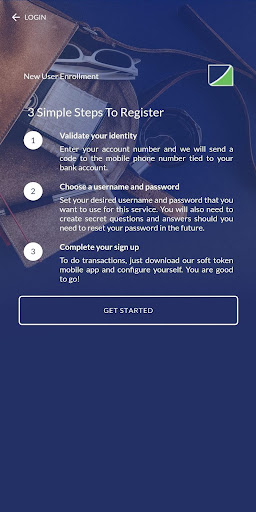
NEW? HOW TO REGISTER
If you’re 16 or above and you have your mobile number registered for our SMS alert services as well as any of our Debit Cards, click on “Sign Up Here”, and follow the onscreen instructions. A verification code will be sent to the mobile phone you have registered for your account number with us.
If you’ve got a verification, follow the onscreen steps to register. You will be required to use your Fidelity Debit Card OR visit the nearest Bank branch to activate your Online banking profile. Once done, you can start using your Online Banking account immediately.
To do much more, download the Fidelity Soft Token app on your phone and sign in with your Online banking cre