IP Phone Camera

IP Phone Camera Summary
IP Phone Camera is a ad-supported, with in-app purchases Android app in Communication by Deskshare Inc. Released in Apr 2017 (9 years ago). It has about 1.7M+ installs and 3.1K ratings with a 3.72★ (average) average. Based on AppGoblin estimates, it reaches roughly 245.4K monthly active users and generates around $10K+ monthly revenue (31% IAP / 69% ads). Store metadata: updated Jun 5, 2025, version 406.
Recent activity: 1.3K installs this week (10.4K over 4 weeks) showing steady growth , and 3.00 new ratings this week View trends →
Data tracking: SDKs and third-party integrations were last analyzed on Jun 1, 2026. The app's network data flows (API traffic to/from the app and its SDKs) were last crawled on Sep 4, 2025.
Store info: Last updated on Google Play on Jun 5, 2025 (version 406).
SDKs, Trackers & Permissions
IP Phone Camera was last scanned for SDKs 2026-06-01. Below is the overview of third party companies detected in the app. The full list of raw SDKs, app permissions and unknown SDKs is available here.
 JetBrains IntelliJ
 JetBrains
 Sentry.io
 Google
 AdMob
AdMob Firebase
App Details
App Store
Ads & App-Ads.txt
AppGoblin SDK Scans
3.72★
Ratings: 3.1K
Screenshots
App Description
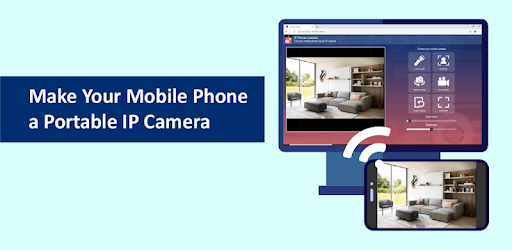
IP Phone Camera turns your phone into a IP Camera
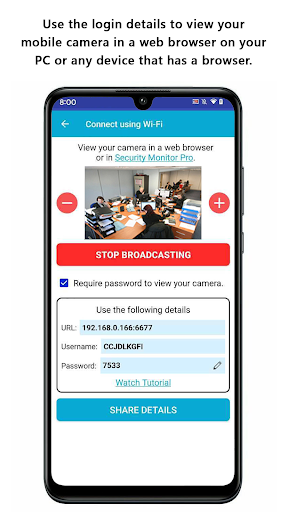
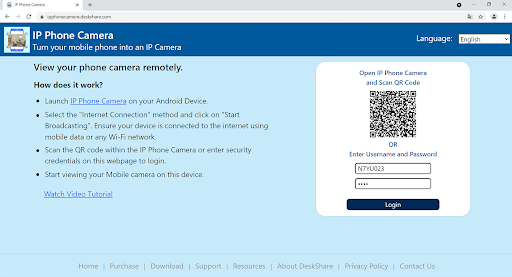
IP Phone Camera will turn your phone into a IP camera. This is a great way to utilize your old Android phones! Use any device that has a browser and an internet connection to view your mobile camera remotely.
Just like any good IP camera, this application also works with video surveillance software, such as - Security Monitor Pro and IP Camera Viewer.
Use IP Phone Camera with Security Monitor Pro to view multiple cameras, capture videos and photos, send email notifications on motion detection and much more. Download this PC software from https://www.deskshare.com/video-surveillance-software.aspx.
Watch the tutorial to see how easy it is to use:
https://www.youtube.com/watch?v=NvIu2Hb5G3U?autoplay=1
Key Features:-
• View your mobile camera in the browser or in a video surveillance software, such as -
Security Monitor Pro and IP Camera Viewer.
• No USB cable is required for connection.
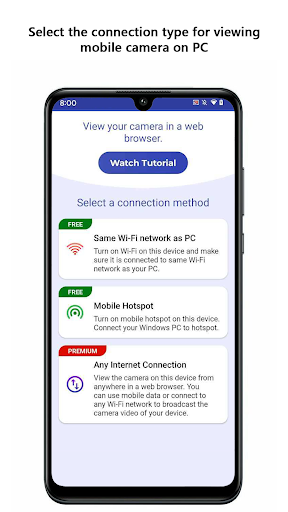
• Choose 'Wi-Fi', 'Mobile hotspot' or 'Mobile Data' to connect with your PC
• Control how and when your phone’s screen should stay on. It helps to prevent mobile
from going into sleep mode while streaming is in progress.
• Broadcast your camera in greyscale to save data and make your camera updates faster.
• Set a password to prevent anyone from randomly viewing your camera.
• View camera in full screen on your PC by maintaining aspect ratio.
• Switch from the front to rear camera easily from your browser.
• Start broadcasting camera preview on application launch.
• Adjust the brightness of camera preview from browser to see a clear image in low light
situations.
• Turn on the flashlight when your camera is monitoring over a dark place.
• Supports multiple languages including German, French, Spanish, Portuguese, Italian, and Dutch.
Note: Camera audio from IP Phone Camera is not supported.
If you need help with IP Phone Camera, please refer to our support forum:
https://www.deskshare.com/forums/ds_topics27_IP-Phone-Camera.aspx
LIKE US and STAY CONNECTED
Facebook: https://www.facebook.com/Deskshare-1590403157932074
Deskshare: https://www.deskshare.com/
Contact Us: https://www.deskshare.com/contact_tech.aspx