Open Qiita


Open Qiita Summary
Open Qiita is a mobile Android app in Productivity by samurai james. Released in Oct 2021 (4 years ago). It has about 776+ installs Based on AppGoblin estimates, it reaches roughly 36 monthly active users . Store metadata: updated Aug 11, 2023.
Recent activity: 1.00 installs this week (1.00 over 4 weeks) showing steady growth View trends →
Store info: Last updated on Google Play on Aug 11, 2023 .
0★
Ratings: 0
Screenshots

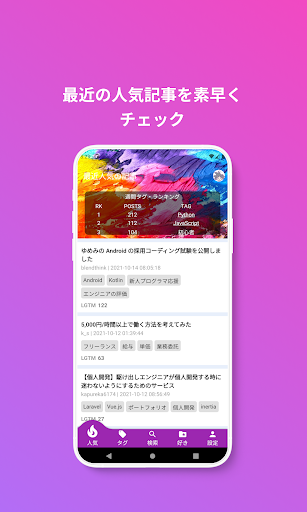


App Description
It is an application of Qiita, a technical article site for developers.
Open Qiita organizes and delivers recent featured articles, saves your favorite articles and makes it easy to read at any time.
■ Features of Open Qiita
1. We will deliver recent popular articles at the same time as the Qiita site. In addition, the weekly popularity tag ranking is also posted, and you can check the list of popular articles attached to that tag with one tap.
2. In addition to displaying tags, you can customize the display of the tag page by long-pressing the displayed tag or the tag that can be added, and dragging and dropping.
3. You can search for related articles by entering keywords. You can change the display order of search results based on conditions such as "related order", "new arrival order", and "LGTM number order".
4. Save your favorite articles to "like" and enjoy them offline (if the article body contains videos or images, the videos or images may not be displayed). You can edit the list of articles saved in "Like" by long-pressing, such as partial deletion or all deletion.
5. You can post comments on articles (Qiita account verification is required), view the comment list, and share the articles on SNS.
6. Use the My Page function to check your basic information (Qiita account verification is required).
7. In addition to abundant theme colors, you can also select the font size of the article body to create a comfortable viewing environment.
8. Qiita has a huge amount of articles, and we have also developed a browsing history function so that you can check what you have read (if you read the same article multiple times, only the first data will be tracked). As with the article list saved in "Like", you can easily manage deleted items by long-pressing.
9. Not only can you see the cache capacity, but you can also manage it by item.