Pen Drive & USB OTG Locker


Pen Drive & USB OTG Locker Summary
Pen Drive & USB OTG Locker is a free, ad-supported, with in-app purchases Android app in Tools by JB Andro. Released in Feb 2026 (7 months ago). It has about 56K+ installs and 165 ratings with a 4.03★ (good) average. Based on AppGoblin estimates, it reaches roughly 5.1K monthly active users and generates around $<10K monthly revenue (58% IAP / 42% ads). Store last updated May 26, 2026
Recent activity: 1K installs this week (4.1K over 4 weeks) showing below average growth , and 10 new ratings this week View trends →
Pen Drive & USB OTG Locker SDKs Summary
App not yet scanned for SDKs.
4.03★
Ratings: 165
Screenshots



App Description
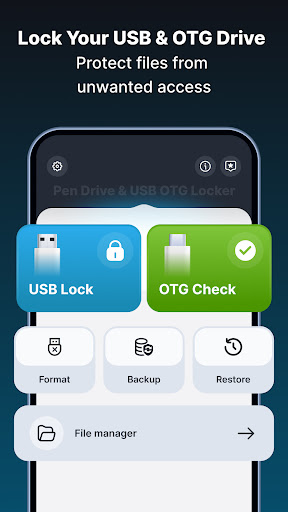
Lock and manage USB OTG drives with PIN, backup, restore, and file manager
Pen Drive & USB OTG Locker helps you protect your USB drive with a simple PIN lock and manage files safely on your phone.
It is useful when you store personal photos, videos, documents, or work files on a pen drive.
You can check OTG support, lock your USB, back up data, and manage files in one app.
Features
1️⃣ USB Lock with PIN
Lock and unlock your USB drive using a 4-digit PIN to prevent unwanted access.
2️⃣ OTG Checker
Check if your phone supports USB OTG before connecting a pen drive.
3️⃣Format USB Drive
Format USB drives when needed to clean or prepare them for fresh use.
4️⃣ Backup USB Data
Back up the entire USB drive or selected files.
5️⃣ Restore from Backup
Restore your saved files back to the USB drive anytime.
6️⃣ Built-in File Manager
Copy, paste, rename, delete, and organize files on internal storage and USB drives.
Use-Case Scenarios
• Carry personal photos and videos on a USB drive and keep them protected
• Store office or study documents and avoid accidental access
• Check your phone is OTG supported or not
• Back up files before formatting pen drive
• Manage USB files directly from your phone without a computer
Why This App Helps
• Keeps your USB data protected with a simple PIN lock
• Reduces the risk of accidental file access or deletion
• Helps manage USB drives easily from your Android phone
• Useful for daily storage, travel, work, and study needs
• Designed for simple USB file handling
A simple and reliable way to lock, manage, and protect your USB OTG files directly from your phone.
• All file access permission :- All Files Access is required to show and manage device storage. This allows you to move files between internal storage, SD cards, and USB drives, and performing the USB operations you select.
REQUEST_INSTALL_PACKAGES : We require the REQUEST_INSTALL_PACKAGES permission to allow users to install apps from an APK list on device storage or USB storage.