AudioGuru Pro Key


AudioGuru Pro Key Summary
AudioGuru Pro Key is a ad-supported Android app in Music And Audio by Jupiter Apps. Released in Aug 2010 (15 years ago). Store metadata: updated Jun 5, 2020.
Store info: Last updated on Google Play on Jun 5, 2020 .
0★
Ratings:
Screenshots


App Description
AudioGuru audio manager with profiles, automatic scheduling and widgets.
This key unlocks the AudioGuru app to give schedules for "work" and "non-work" days.
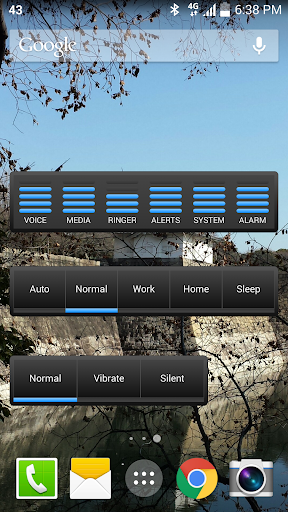
Easily set your volume levels with home screen volume control widgets. Manually apply volume presets straight from the widgets or schedule them for a time of day. Optionally also schedule your ringer, alerts and alarm default ringtones.
AudioGuru is the attractive and well featured audio manager for your phone volume levels and ringer modes.
★ Manage media, ringer, alert, system and alarm volume levels.
★ 4 Custom volume profiles (presets).
★ Rename and edit Profiles.
★ Configure your default ringtones for ringer, alerts and alarm.
★ Automatically set profiles depending on time of day.
★ Solid and translucent widget skins.
★ 4 home screen widget sizes available.
★ Scheduler to automatically apply your presets whenever you want.
★ Available in over 5 different languages
TO RENAME A PROFILE: long press the profile button on the auto scheduling screen.
PRO KEY allows different schedules for work and non-work days.
TIP: Disconnect your ringer and alert volumes levels in your phone sound settings.
NOTE: Android 4+ (ICS) DOES NOT let the ringer and alerts volumes be separated. Pre Android 4 phones can still separate them in the phone sound settings.
As a work around solution on ICS you can enable the adjustment of the ringtones and set your alert ringtone to "silent" for a particular profile e.g. sleep.