KinBo: Ebook & Comic Converter


KinBo: Ebook & Comic Converter Summary
KinBo: Ebook & Comic Converter is a mobile Android app in Comics by Shasha's Techlab. Released in Apr 2026 (1 month ago). It has about 404+ installs Based on AppGoblin estimates, it reaches roughly 173 monthly active users . Store metadata: updated May 30, 2026.
Recent activity: 105 installs this week (316 over 4 weeks) showing exceptional growth View trends →
Store info: Last updated on Google Play on May 30, 2026 .
0★
Ratings: 0
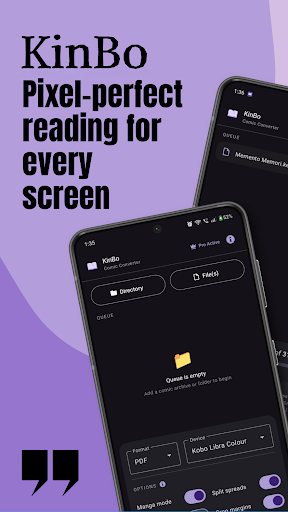
Screenshots



App Description
Optimize & convert manga, ebook and comic for Kindle, Kobo and E-ink devices.
KinBo: Ultimate Ebook & Manga Converter for Kindle & Kobo.
Unlock the elite reading experience on your E-ink device! KinBo is the most powerful mobile tool designed to bridge the gap between your digital library and your eReader. Whether you are a manga enthusiast or a prose lover, KinBo ensures every page—whether image-based or text-native—is perfectly optimized for your screen.
Transform your mobile device into a professional-grade conversion station for Kindle, Kobo, BOOX, PocketBook, and reMarkable.
📚 UNIVERSAL EBOOK & MANGA SUPPORT
KinBo is no longer just for comics. It is now a universal bridge for all your reading content:
Manga & Comics: Transform CBZ, CBR, and ZIP archives into high-performance eBooks.
Mihon/Tachiyomi Ready: Fully compatible with your downloaded archives and chapter folders.
Reflowable Ebooks: Convert text-native EPUB and PDF files. KinBo extracts and re-packages prose to ensure perfect font control and smooth page turns.
🌟 WHY CHOOSE KINBO FOR YOUR eREADER?
Reading on a Kindle or Kobo can be frustrating due to heavy files and poor formatting. KinBo solves these problems with an elite suite of optimization tools:
✂️ Smart Margin Cropping: Automatically detects and trims white borders to maximize your viewing area.
📖 Spread Splitter: Perfect for Manga! Automatically splits double-page spreads into two portrait pages or rotates them for the best fit.
🌗 E-Ink Grayscale Pro: Convert color content to high-quality grayscale to drastically reduce file size and improve battery life.
🎚️ Custom Gamma Control: Fix washed-out or overly dark scans. Fine-tune the contrast and mid-tones to achieve the perfect punchy blacks and crisp whites for your specific E-ink screen.
🌈 Rainbow Eraser: Eliminate chromatic aberration and color noise from raw web scans. Our smart filter cleans up distracting color banding to ensure pristine, artifact-free pages.
🚀 AI-Powered Upscaling: Sharpen low-resolution scans so they look stunning on modern high-DPI screens like the Kindle Scribe or Kobo Libra Colour.
🏷️ Custom Metadata Editor: Take control of your library! Edit Book Title and Author name before conversion so your library is always perfectly sorted.
🛠️ PRO FEATURES AT YOUR FINGERTIPS
Full KEPUB Support: The premier mobile converter for true Kobo KEPUB files with fast navigation and full Table of Contents.
Sticky Settings: KinBo remembers you! Your favorite device profiles and conversion flags are saved automatically.
Batch & Folder Processing: Add entire series or nested directories and convert them in one tap.
Device-Specific Profiles: Optimized presets for Kindle Paperwhite, Kindle Oasis, Kobo Clara, BOOX, reMarkable, and more.
Parallel Processing: Leverage your phone's full power for lightning-fast conversions.
📁 SUPPORTED FORMATS
Input: CBZ, CBR, PDF, EPUB, ZIP, RAR, and Image Folders (JPEG, PNG, WEBP).
Output: EPUB, KEPUB (Kobo native), PDF, and CBZ.
🚀 HOW IT WORKS (3 SIMPLE STEPS)
Add Content: Select your manga files, folders, or ebooks.
Customize: Pick your reader profile, dial in your gamma settings, and edit the metadata (Title/Author).
Convert & Sync: Hit convert and transfer your optimized file to your Kindle or Kobo for a premium reading experience!
💎 KinBo PRO
Love the app? Go Pro to remove all ads and support the development of the world’s most advanced mobile eReader converter.
Search terms: Kindle converter, Kobo Manga reader, CBZ to EPUB, CBR to Kindle, EPUB to KEPUB, E-ink optimizer, PDF to Kindle, Manga to Kobo, Metadata editor, Mihon, Tachiyomi, Kindle Scribe, Kobo Libra, Ebook formatter, Comic book resizer, Gamma correction, scan cleaner.