광주 와뱅크

광주 와뱅크 Summary
광주 와뱅크 is a ad-supported Android app in Finance by The Kwangju Bank, Ltd.. Released in Aug 2021 (4 years ago). It has about 1.6M+ installs and 10.1K ratings with a 4.08★ (good) average. Based on AppGoblin estimates, it reaches roughly 148.7K monthly active users and generates around $<10K monthly revenue (0% IAP / 100% ads). Store metadata: updated May 11, 2026, version 191.
Recent activity: 6.3K installs this week (22.3K over 4 weeks) showing steady growth , and 8.00 new ratings this week View trends →
Data tracking: SDKs and third-party integrations were last analyzed on May 2, 2026. The app's network data flows (API traffic to/from the app and its SDKs) were last crawled on Oct 18, 2025.
Store info: Last updated on Google Play on May 11, 2026 (version 191).
광주 와뱅크 was last scanned for SDKs 2026-05-02. Below is the overview of third party companies detected in the app. The full list of raw SDKs, app permissions and unknown SDKs is available here.
 JourneyApps
 Kakao
Kakao Google
 Firebase
4.08★
Ratings: 10.1K
Screenshots



App Description
Enjoy your financial and daily life together at Gwangju Wa Bank.
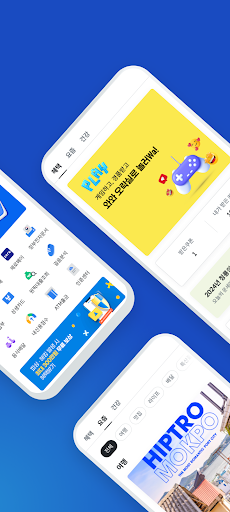
Gwangju Wabank is here to help you with your financial and daily life. ■ 3 Home Screen Types
- Plus Mode offers a variety of benefits and information
- Basic Mode allows you to view only your account information at a glance
- Easy Mode provides only the necessary menus in a large, organized layout
■ No Transfer Fees
- No transfer fees regardless of the number of transactions or amount sent
■ Provides a variety of beneficial information
- Easily discover restaurants and attractions near the Gwangju-Jeonnam region through the app
- Health Index check and health management tips
■ Easier and Faster Transfers
- Easy transfer service for users with financial certificates, bank IDs, and joint certificates (transfers of up to 5 million won per transaction/day can be made using just your account password)
- Conveniently transfer funds using KakaoTalk messages or your mobile phone number, even if you don't know your account number
■ View My Account/My Card at a Glance
- Register with other financial services and view My Account/My Card at a glance
- View your main account/main card information on the main screen
■ Useful Services for a Smarter Financial Lifestyle
- View your bank, brokerage, and fintech information at a glance Account Info
- Smart consumption that coexists with the local community, local currency services (Gwangju Mutual Aid, Mokpo Love)
- Smart notification box packed with useful financial information
- Smart ways to receive allowances, allowance request service
■ My Data Service
- MY Asset Service: View your assets scattered across multiple institutions at a glance
- Real estate price inquiry, income/expense analysis, and card spending analysis services that analyze your assets and consumption status
- Credit management services for a convenient and smart financial life, including quick claims for actual loss insurance, retirement calculator, and travel destination search, as well as life services
- MY Healthcare Service: Manage your health with a step counting function linked to your health data
■ Customer Center Information
- Service Usage Methods and Hours: 1588-3388 or 1600-1400
[Business Days 09:00-18:00. Other hours are only for accident reporting]
- For the Visually Impaired: 1644-7766
- Senior Citizens Only: 1661-3633 (Easy Language Service)
- KJ Card Only: 1577-3650
■ App Permission Information
- Phone (Required):
1. Additional information regarding phone permissions
When using Smart Easy Authentication, your phone number is verified through the carrier (SDK) for mobile phone authentication and access to your phone's status and device information.
This permission allows USIM information (phone number data) to be provided to the respective carriers (SKT/KT/LGT).
This information is used to collect device information for secure financial services such as phone authentication, device authentication, login, push notifications, and fraud prevention (transfer notifications during calls).
2. Mobile Phone User Authentication
3. Digital OTP Issuance and Use
[Your mobile phone number will be provided to the Korea Financial Telecommunications and Clearings Institute (https://ssc.ktfc.or.kr).]
- Storage (Required): Use of joint certificates, image storage, etc.
- Contacts (Optional): Mobile phone transfers, allowance request services, etc.
- Camera (Optional): ID photo, import of joint certificates (QR code), Zero Pay payments, easy utility QR code payment, face authentication, etc.
- Photo (Optional): Save transfer confirmation, select allowance request images, etc.
- Location Information (Optional): Location authentication services, etc.
- Physical Activity (Optional): Step counting, etc.
- You can use the Gwangju Bank app (Gwangju Wabank) without consenting to optional access permissions. However, some services may be restricted.
- How to change access permissions: Settings > Applications > Gwangju Wabank > Permissions > Change by access permission