Klipsch Connect


250.9K installs
3.8K ratings
5.9K monthly active users
Revenue not available
Install Trends
Weekly +205
SteadyMonthly +696
SteadyKlipsch Connect Summary
Klipsch Connect is a mobile Android app in Music And Audio by 11 Trading Company LLC. Released in Mar 2020 (6 years ago). It has about 250.9K+ installs and 3.8K ratings with a 3.91★ (average) average. Based on AppGoblin estimates, it reaches roughly 5.9K monthly active users . Store metadata: updated Nov 14, 2023.
Recent activity: 205 installs this week (696 over 4 weeks) showing steady growth , and 5.00 new ratings this week View trends →
Store info: Last updated on Google Play on Nov 14, 2023 .
3.91★
Ratings: 3.8K
Screenshots
App Description
Get the most out of your Klipsch powered monitors, soundbars, and earphones!
Need Help?
Need support or have a feature suggestion? Please reach out to our Product Support team via:
• Live Chat in the App or
• Web: https://support.klipsch.com or
• Call: +1-800-KLIPSCH
Klipsch Connect™ works with:
☑️ The One Plus and The Three Plus tabletop speakers
☑️ The Fives, The Sevens, The Nines, and The Nines McLaren powered monitors
☑️ Cinema 700, 800 and 1200 Series soundbars
☑️ Cinema 600 Series soundbar
☑️ T5 Series True Wireless earphones
☑️ T5 II Series True Wireless earphones
☑️ T5 II ANC series True Wireless earphones
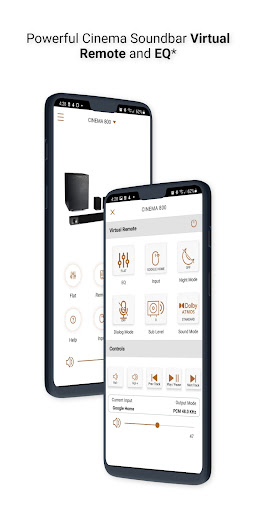
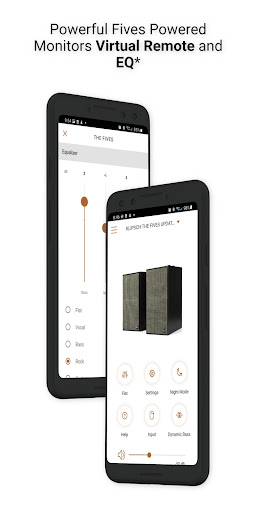
Soundbar and Powered Monitor products all support EQ and Virtual Remote Control. You can easily personalize your earphone experience by adjusting EQ, transparency, and ANC settings. You can install feature updates, troubleshoot common issues, contact product support - including in-app Live Chat, and much more.
Features (availability varies by product)
• Virtual Remote Control
• EQ Presets
• Custom EQ Adjustments
• ANC Level Control
• Transparency Mode & Level
• Dirac HD Sound
• Dynamic Bass Control - a.k.a. "Loudness"
• Room Placement Control - a.k.a. "Bass Cut Mode"
• Dolby Atmos (tm) Sound Mode Control
• Night Mode and Dialog Mode Control
• Channel-Specific Volume Control
• Subwoofer Volume Control
• Bragi AI, Moves & Sidekicks
• Battery Level & Status
• Live Chat with Support (during business hours)
• Quick-Start Guides & Product Manuals
• How-To Videos and FAQs
• Product Firmware and Feature Updates
• Product Registration
• Easy Access to Product Support
IMPORTANT FIVES UPDATE: If you cannot connect after you run the Fives Updater app, that means Step 1 did not complete successfully. Make sure to run the USB update. If you need help, we're here for you - please reach out to Product Support (link below) and we'll help you complete the update.
How to Access Cinema Soundbar and Fives, Sevens, and Nines Virtual Remote Capabilities
Cinema 1200, 800, and 700
Virtual Remote Control and EQ features require the soundbar be running the latest update. This normally happens automatically when the soundbar has been connected to the Internet, either via Klipsch Connect or Google Home. If your device has not been connected to the Internet, please contact our Product Support Team for assistance. See details below.
The Fives, The Sevens, and The Nines, including McLaren Editions
Virtual Remote Control and EQ features require the powered monitors be running the latest update. If you have not updated your Fives already, please download the free "Klipsch The Fives Updater" app. This will walk you through the update process. After the update is complete, all future updates will come through Klipsch Connect. Our Product Support team can walk you through the entire process. Simply reach out to us at:
• Live Chat in the App! or
• https://support.klipsch.com or
• +1-800-KLIPSCH