MarkMaster - tagging images


MarkMaster - tagging images Summary
MarkMaster - tagging images is a mobile Android app in Tools by KoiBox Technology. Released in May 2025 (10 months ago). Store metadata: updated Aug 25, 2025.
Store info: Last updated on Google Play on Aug 25, 2025 .
0★
Ratings:
Screenshots
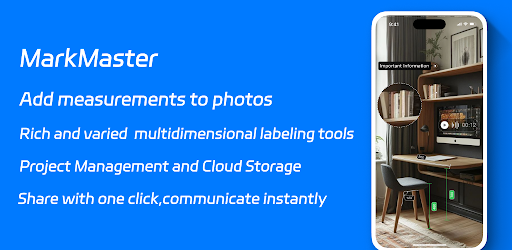


App Description
Professional Image Marking and Sharing, Essential for Project Efficiency
MarkMaster is a powerful mobile-first annotation solution designed for architects, engineers, design professionals and DIY enthusiasts. This all-in-one app enables efficient project communication through photo annotation, precision measurement tools, and cloud-based collaboration - perfect for field measurements, design reviews, and construction documentation. All data is securely stored in cloud-based project folders with multi-device sync, ensuring zero data loss.
Multi-Industry Solution
Tailored for interior designers, contractors, construction crews, home improvement specialists, and custom home design professionals, MarkMaster simplifies workflows with:
1. Field Measurement Tools: Laser-like accuracy for room dimensions and Image Annotation (compatible with Bluetooth laser measures)
2. Material Specs Annotation: Streamline communication with suppliers and clients
3. Construction Documentation: Capture progress photos with layered annotations
Smart Markup for Enhanced Productivity
Simplify complex communication with intuitive annotation tools that reduce errors and accelerate project timelines. Whether conducting field measurements, design reviews, or team collaborations, achieve crystal-clear information sharing that keeps projects moving forward.
Core Features
1. Smart Annotation Toolkit
a. Precision Measurement: Drag-to-measure with unit conversion (cm/in) and custom color coding
b. Shape Markers: Add arrows, angles, and polygons with text callouts for image
c. Voice Notes: Record audio annotations on-the-go
d. Magnifier Tool: Zoom in on material textures or construction details
e. Text Styling: Customizable labels with color/opacity controls
2. Enhanced Visualization
a. Overlay Markers: Annotate directly on photos/videos of job sites
b. Icon Library: 200+ customizable industry symbols (electrical, plumbing, etc.)
c. Background Optimization: Adjust image contrast for clear markups
e. Media Overlays: Layer reference images/videos with adjustable sizing
f. Audio/Video Notes: Capture verbal instructions or process videos
3. Professional Grade Integration
a. Bluetooth Laser Measure Compatibility: Works with 90%+ models (e.g., Leica DISTO D series)
b. Blueprint-Ready Export: Generate PDF/JPG/ZIP reports with measurement specs
4. Cloud Collaboration
a. Project Workspaces: Organize blueprints, photos, and notes with team access controls
b. Auto-Backup: Version history and 30-day Trash recovery
c. Cross-Platform Sync: Access projects from any iOS device
---Safety Features ---
Recycle Bin recovery for accidental deletions
MarkMaster: Where Precision Meets Efficiency
Download now to transform how you communicate visual information!
---Premium Features---
* Expanded cloud storage (5GB+)
* Ad-free experience
* Priority feature requests
* Advanced export option
---Legal---
Terms of Service: https://www.markmaster.top/agreement/user_en.html
Privacy Policy: https://www.markmaster.top/agreement/privacy_en.html
We Value Your Feedback
Help us improve! Rate us on the App Store or contact support@markmaster.top.