白色申告アプリ Kaikei Lite - 確定申告の帳簿


白色申告アプリ Kaikei Lite - 確定申告の帳簿 Summary
白色申告アプリ Kaikei Lite - 確定申告の帳簿 is a free, with in-app purchases Android app in Finance by Komorebi Inc.. Released in Sep 2022 (4 years ago). It has about 7.9K+ installs and 26 ratings . Based on AppGoblin estimates, it reaches roughly 687 monthly active users and generates around $<10K monthly revenue (100% IAP / 0% ads). Store last updated Jul 16, 2026
Recent activity: 43 installs this week (147 over 4 weeks) showing above average growth View trends →
白色申告アプリ Kaikei Lite - 確定申告の帳簿 SDKs Summary
App not yet scanned for SDKs.
0★
Ratings: 26
Screenshots



App Description
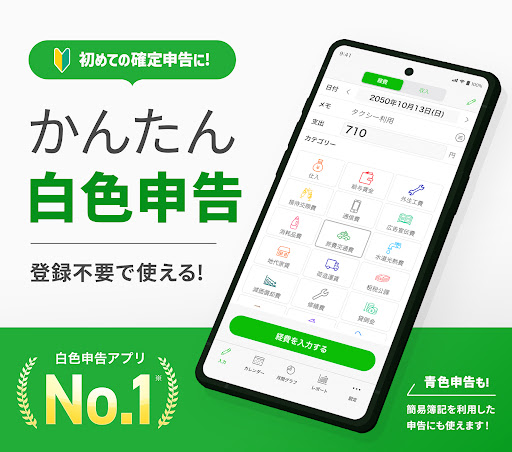
This is an accounting and bookkeeping app that is ideal for first-time tax returns, and is a simple accounting software app that supports white tax returns and simplified bookkeeping.
Looking for your first tax return app? Try Kaikei Lite!
This accounting app is designed for white-form tax returns and simplified bookkeeping.
It's especially recommended for sole proprietors, freelancers, and restaurant owners.
Quickly input your daily expenses and sales into the app, and easily view and export the data needed for your tax return to Excel.
Try out its many convenient features for free!
There's also a sister app, "Kaikei," which supports double-entry bookkeeping for blue-form tax returns. This app has features specifically for blue-form returns and is slightly more expensive.
Kaikei Lite is specifically designed for those filing white-form or blue-form simplified bookkeeping returns, offering a more affordable option for those needing a simpler tax return.
--------------------
▼ How to Use Kaikei Lite
--------------------
Here's how to file your tax return using Kaikei Lite.
1. Enter daily receipts and expenses in Kaikei Lite
2. Analyze your income and expenses with a wealth of reports
3. Export and print your ledger data to Excel during tax season
4. Fill in the data displayed in the app on your tax return form and submit it!
Quickly input your daily ledger data with this app.
When tax season arrives, you can export your ledger data and save it on your computer. When filing your taxes, simply enter the numbers displayed in the app into the tax return form to submit to the tax office! You can also print ledger data and lists by sending the data from the app to your printer without using a computer.
For detailed information on the tax filing process, please see the "About Tax Filing" section in the app's help screen.
--------------------
▼ Recommended for people like this
--------------------
・Want to easily keep records on their smartphone
・Have filed a white tax return every year and will probably continue to do so
・Don't want to spend too much money on accounting software
・Want to file their tax return as easily as possible
・Are a sole proprietor or freelancer with a small business
・Have never filed a tax return before
・Need to file a tax return for a side business
・Worried about linking bank accounts or credit cards
・Want a simple accounting app for recording data
・No unnecessary features, just the ability to export to Excel is fine
Kaikei Lite allows you to freely set and create account categories.
You can also freely leave notes and descriptions, and export the data to Excel, making it compatible with other accounting software.
(※Supports import to major accounting software such as Yayoi Accounting, freee, and MF Cloud Expenses.)
--------------------
▼ List of Features
--------------------
・Output and Printing of General Ledger
・Transaction Search
・Monthly Income and Expense Report
・Asset Balance Trend Report
・Calendar
・Customization of Account Titles
・16 Theme Colors
・App Icon Customization
・Automatic Registration of Fixed Income and Expenses
・Switching between up to 5 Ledger Accounts
・Passcode Lock Function
--------------------
▼ Explanation of Features
--------------------
◆ Inputting Expenses and Sales
Tap the easy-to-press account title buttons and enter the amounts.
The keyboard includes a convenient calculator.
It features large, easy-to-read numbers and easy-to-press buttons for user-friendliness.
There is also a convenient auto-input mode that allows you to continuously input accumulated receipts and invoices in batches.
You can enter memos and descriptions, as well as register standard phrases.
◆ Calendar
Easily grasp your income and expense status on the calendar.
You can also change the starting day of the week and the start and end dates of the month. For corporations, you can set the business start year as the start month.
You can input and delete entries directly from the calendar, allowing you to input receipts and other data all at once.
Furthermore, you can set an initial balance, enabling you to display carry-over balances, cumulative assets, and amounts.
◆Reports
Monthly income and expenses are visualized in pie charts, allowing you to understand your financial situation.
You can check the percentage of expenses and individual data for each category, revealing overspending and trends in income and expenses.
◆CSV Output
Input data can be output as CSV Excel data.
In addition to outputting the general ledger, you can also output data by account category and by customer.
You can even print each data directly from the app to your printer.
◆Theme Color
You can change the app's theme color.
You can customize the design to your liking with your favorite color, such as cute pink or chic dark blue.
You can also change the app icon to match the theme color.
You can choose from over 16 theme colors to create your preferred design.
◆Passcode Lock
By setting a PIN, you can lock access to important accounting data.
--------------------
▼ About the Plans
--------------------
● Standard Plan (Free)
Upon initial installation, you will be on the Standard Plan.
The Standard Plan allows you to use almost all functions for free, but there are limits on the number of CSV file exports and data registrations. First, we recommend experiencing the app's usability with the Standard Plan and confirming how you will use it until your tax return.
If you have few income or expense payments, you can continue using the Standard Plan for free, but we recommend subscribing to the Standard Plan for continued use.
● Standard Plan
・Unlimited data registrations (normally up to 16 times per month)
・Annual category report viewing
・Unlimited CSV data exports (normally up to 5 times)
・Priority support
Price: First year: ¥2,800 per year (equivalent to ¥233 per month)
Subsequent years: ¥3,500 per year (equivalent to ¥292 per month)
You can use all the necessary functions for filing your tax return without stress and without limits.
--------------------
▼ Pricing Plans
--------------------
• Standard Plan: Free
• Standard Plan: ¥2,800 per year for the first year (equivalent to ¥233 per month)
• ¥3,500 per year from the second year onward (equivalent to ¥292 per month)
*Prices are subject to change.
*Payment Information
This plan is offered as a Google Play subscription service. Your Google account will be charged.
*Cancellation Method
You can cancel anytime from [Subscriptions] in the Google Play app.
*Please note that we do not accept cancellations for the current year or current month.
--------------------
Questions and Inquiries
--------------------
Please contact us via "Contact Us" in the app's help screen.
This app has no troublesome tutorials or registrations, and you can try it for free immediately. We encourage you to download the app and experience its intuitive and convenient features.
[Terms of Use]
https://komorebi-studio.com/privacy_policy_kaikei.html
[Privacy Policy]
https://komorebi-studio.com/tos.html
*Regarding the claim of being the No. 1 white tax return app:
As of April 15, 2026, the app is ranked No. 1 in search results for the term "white tax return" on Google Play Japan (Source: data.ai)