AR Draw Sketch - Draw & Trace


AR Draw Sketch - Draw & Trace Summary
AR Draw Sketch - Draw & Trace is a ad-supported Android app in Tools by Yaksh Software. Released in Oct 2023 (2 years ago). It has about 382.6K+ installs Based on AppGoblin estimates, it reaches roughly 19.8K monthly active users and generates around $<10K monthly revenue (0% IAP / 100% ads). Store metadata: updated Nov 25, 2024.
Recent activity: 8K installs this week (8K over 4 weeks) showing exceptional growth View trends →
Store info: Last updated on Google Play on Nov 25, 2024 .
0★
Ratings: 0
Screenshots


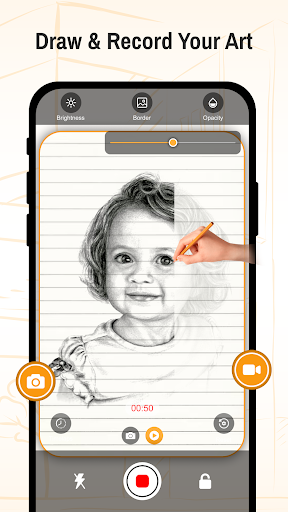
App Description
The quickest way to learn sketching and drawing with AR Draw Sketch - Trace App.
AR Draw Sketch - Draw & Trace is the quickest way to learn sketching by using the tracing method.
AR Draw Sketch - Draw & Trace app provides the easiest way to learn to sketch for any generation of people.
Wake up your inner artist with the AR Draw Sketch - Draw & Trace App! This app is your perfect tutor to learn sketching and drawing effortlessly.
Simply pick one of your choice objects from the collection import it to a camera or canvas with your choice, and start to learn the drawing without any companion tool.
AR Draw Sketch - Draw & Trace app transforms your smart device into an artistic tool with which you can easily transform any image into a masterpiece of sketch with just a few clicks.
How to sketch and draw?
1. Tap on start and find the collection of sketches categories
2. Select one of your choice category and pick one of your choice object
3. You have the choice to go with the camera and canvas option
4. Use the camera to start drawing by mounting the mobile device on a tripod and use the canvas to trace any object on paper by placing it on the phone
5. Set your choice image according to your needs and start drawing now
Key Features:
⭐ Improve your drawing skills
⭐ Learn sketching through this app
⭐ Best test collection of objects for tracing
⭐ Camera allows to draw images by mounting mobile on device
⭐ Canvas to trace images by placing the paper on a mobile screen
⭐ Allows to adjust brightness, border, and opacity
⭐ Flash support while you are trying to trace the image
⭐ Lock the sketching screen to make your object on the mobile screen
⭐ You have the choice to make a video clip while you are trying to convert a picture into a sketch
⭐ Simple and easy-to-use app coming with attractive UI Design