KW Video Downloader - Kwibo


KW Video Downloader - Kwibo Summary
KW Video Downloader - Kwibo is a ad-supported, with in-app purchases Android app in Video Players by Lean Apps!. Released in May 2024 (1 year ago). It has about 166.4K+ installs and 2.1K ratings with a 4.88★ (excellent) average. Based on AppGoblin estimates, it reaches roughly 11.8K monthly active users and generates around $<10K monthly revenue (49% IAP / 51% ads). Store metadata: updated Feb 6, 2026, version 40004.
Recent activity: 4.1K installs this week (5.6K over 4 weeks) showing exceptional growth , and 9.00 new ratings this week View trends →
Data tracking: SDKs and third-party integrations were last analyzed on Mar 19, 2026. The app's network data flows (API traffic to/from the app and its SDKs) were last crawled on Nov 14, 2025.
Store info: Last updated on Google Play on Feb 6, 2026 (version 40004).
KW Video Downloader - Kwibo was last scanned for SDKs 2026-03-19. Below is the overview of third party companies detected in the app. The full list of raw SDKs, app permissions and unknown SDKs is available here.
 Square
 Bumptech
 Facebook
 Kotlin
 One Signal
 Google
 Firebase
 RevenueCat
 AdMob
AdMob4.88★
Ratings: 2.1K
Screenshots


App Description
Easy to download HD videos for kw without watermark. It's simple
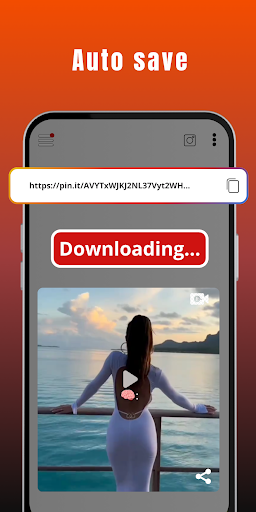
KW Video Downloader is your best choice! Just copy the link of the video you want to download, Open Video Downloader for KW - Free & No Watermark and the download will start automatically.
Video Downloader for KW - "kw app video download without watermark" is a kw video downloader app that allows you to easily download videos and photos with just a few clicks.
Use KW Video Downloader - "kw app video download" to download your favorite videos and relive them anytime!
With Video Downloader for KW - Free & No Watermark it's easy to save videos and images. It supports downloading multiple files at once. You can also download kw videos without watermark, fast and easy.
Repost fun videos or photos to your own account or easily share with your friends. It's simple, fast and 100% free for you to use unlimitedly.
How to download kw videos without watermark?
Option 1: Use ‘Share Link’ to download video
- Open KW app and click on the "Share Link" of the video you want to download.
- Select Video Downloader for KW - Without Watermark to share.
- Done! The video will be downloaded automatically.
- You can find it in your "Downloaded video list" or gallery.
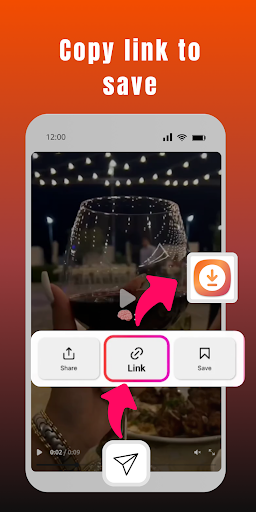
Option 2: Use ‘Copy Link’ to download video
- Open KW app and click on the "Copy Link" of the video you want to download.
- Open KW Video Downloader - Without Watermark.
- Done! The video will be downloaded automatically.
- You can find it in your "Downloaded video list" or gallery.
Kw videos without watermark will be automatically downloaded and saved to "Downloaded video list" or gallery and you can enjoy them at any time!
Key Features:
- Download kw HD videos
- Download kwshou videos
- Offline mode: Watch downloaded videos without an internet connection.
- Free and fast: Save videos super fast with unique download speed boost. Much faster than other video downloaders for KW.
- High definition videos: Supports all HD video downloads, allows you to download kw videos without watermark, short videos and HD videos.
- Easy Sharing: Share videos without watermark with your friends via "Video Downloader for KW - Free & No Watermark" app.
- Download videos by copying or sharing URLs. Videos can be downloaded automatically.
- Easy to use: Download kw videos without watermark with just one click.
- Repost: Post the downloaded videos, without watermark, on kw through the "kw video downloader without watermark" application.
Download videos and photos for kw
You can download the videos you like with kw video downloader without watermark - The application for downloading videos for kw without watermark. Just share the link of any video with the app and it will download the video for you in seconds.
🚨Disclaimer:
This app is just a download tool and has no affiliation with the kw platform.
Additionally, it is important to understand that ownership, intellectual property rights and any other interests related to videos, photos and music on the platform belong to their respective publishers or owners.
We fully respect these rights and legitimate interests of publishers and owners.
We are not responsible for videos downloaded using this App, download at your own risk, in any case, we recommend that you obtain permission before downloading and using any content.
Furthermore, it is essential that you attribute the source of the content when using it, whether it is a video, a photo or any other content that has been downloaded.
Content owners on kw retain all rights. Get permission before reposting.
Any unauthorized downloading or re-uploading of content and/or violations of intellectual property rights is the sole responsibility of the user.