BlueDriver OBD2 Scan Tool

BlueDriver OBD2 Scan Tool Summary
BlueDriver OBD2 Scan Tool is a mobile Android app in Auto And Vehicles by Lemur Vehicle Monitors. Released in Jan 2014 (12 years ago). It has about 2M+ installs and 17K ratings with a 3.67★ (average) average. Based on AppGoblin estimates, it reaches roughly 30.6K monthly active users . Store metadata: updated May 27, 2026, version 55555621.
Recent activity: 2.4K installs this week (10.2K over 4 weeks) showing steady growth , and 3.00 new ratings this week View trends →
Data tracking: SDKs and third-party integrations were last analyzed on May 2, 2026.
Store info: Last updated on Google Play on May 27, 2026 (version 55555621).
SDKs, Trackers & Permissions
BlueDriver OBD2 Scan Tool was last scanned for SDKs 2026-05-02. Below is the overview of third party companies detected in the app. The full list of raw SDKs, app permissions and unknown SDKs is available here.
AppGoblin saw BlueDriver OBD2 Scan Tool uses 2 Business Tools
 Zendesk
 Keepsafe
AppGoblin saw BlueDriver OBD2 Scan Tool uses 4 Development Tools
 Google
 Square
 MongoDB
 Kotlin
AppGoblin saw BlueDriver OBD2 Scan Tool uses 2 Ad Networks
 Facebook
AppGoblin saw BlueDriver OBD2 Scan Tool uses 1 Analytics: Product
 Firebase
App Details
App Store
Ads & App-Ads.txt
AppGoblin SDK Scans
3.67★
Ratings: 17K
Screenshots
App Description
BlueDriver® is a Premium Diagnostic OBD2 Scan Tool. www.BlueDriver.com
BlueDriver® transforms your phone or tablet into a powerful OBD2 scan tool – trusted by over 1 million drivers, from professional mechanics to DIYers. Paired with the BlueDriver Bluetooth® Sensor (sold separately), it lets you read codes, diagnose issues, and fix your car with confidence—no wires, no guesswork.
Whether you're checking a check engine light, running a smog test, or diving into enhanced diagnostics like ABS or transmission codes, BlueDriver gives you the tools you need to understand your vehicle and make smarter repair decisions – with clear, easy-to-understand information.
What You Can Do with BlueDriver
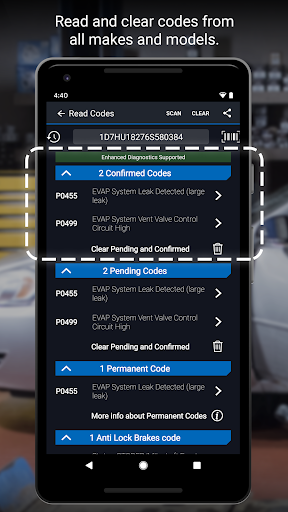
· Read and clear trouble codes - including check engine, ABS, airbag, transmission, and more
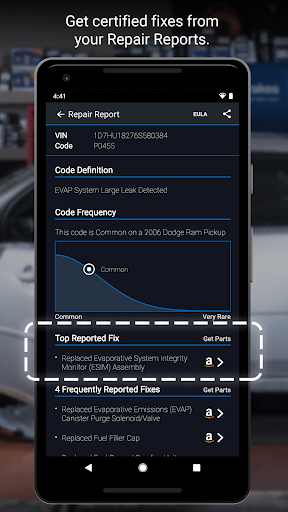
· Generate, save, and share professional-grade Repair Reports based on your exact vehicle and trouble code
· Access Mode 6 on-board monitoring test results
· Check smog readiness and freeze frame data
· View live data with multi-PID interactive graphing
· Scan your vehicle wirelessly with Bluetooth—no cables required
· Choose between metric and imperial settings
· Get likely fixes for your vehicle’s issues, explained in plain language
Enhanced Diagnostics Coverage
· GM, Ford, Chrysler, Toyota, Nissan, Mazda, Mercedes (2005+ models)
· Mitsubishi (2008+), Hyundai/Kia (2012+) – available worldwide
· BMW/Mini, Honda/Acura, Volkswagen/Audi – available in North America
· Subaru – available in the United States
What Makes BlueDriver Different?
· No subscription required
· Backed by a database of millions real-world fixes
· Repair Reports are specific to your vehicle’s year, make, and model
· Works globally with the BlueDriver Sensor
· App is free to install—just pair with the Sensor to start scanning
You can even preview a Repair Report without a Sensor by entering your VIN and a trouble code.
Account Setup Made Easy
You’ll create a BlueDriver account during setup—it’s quick and easy, and gives you secure access to all your scans, reports, and new features across any device.
Important Info
The BlueDriver Sensor plugs into your vehicle’s data port (found in every car built since 1996). It connects to the app via Bluetooth® to deliver full diagnostic functionality.
Sensor sold separately in-app or at www.BlueDriver.com