폴에듀 전자출결(직원용)

폴에듀 전자출결(직원용) Summary
폴에듀 전자출결(직원용) is a mobile Android app in Education by Sitin Corp.. Released in Apr 2019 (7 years ago). It has about 173.9K+ installs Based on AppGoblin estimates, it reaches roughly 2.7K monthly active users . Store metadata: updated Oct 28, 2025.
Recent activity: 129 installs this week (829 over 4 weeks) showing below average growth View trends →
Store info: Last updated on Google Play on Oct 28, 2025 .
0★
Ratings: 0
Screenshots


App Description
It is a Bluetooth beacon-based electronic attendance application used exclusively for employees of the National Police Agency (including all local offices and educational institutions).
It is exclusively for employees of the National Police Agency (including all local offices and educational institutions) and can log in using the internal integrated portal ID and individually designated password (approval from the education manager is required).
Through the app, you can simply confirm your attendance at workplace training using the terminal's fingerprint recognition or facial recognition function.
Attendance can be freely acknowledged from any location in the classroom.
You can check individual attendance status and request changes (appeals) to attendance results.
〔main function〕
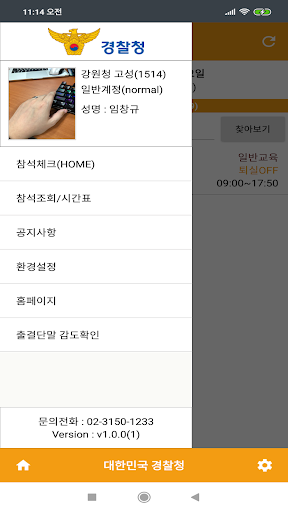
1. Attendance check (HOME): Request for recognition of attendance at workplace training (workplace education, martial arts training, shooting, physical fitness test) and workshops, etc.
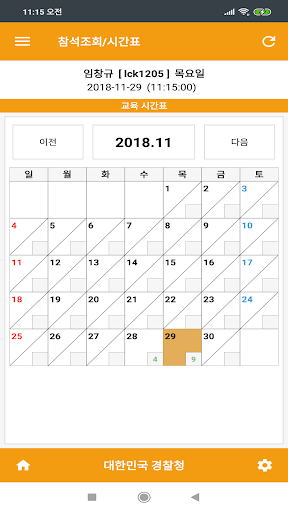
2. Attendance inquiry/timetable: Provide monthly workplace training schedule for each government office/check individual attendance status/file objections, etc.
3. Notice: Notice (push) message to the person in charge, such as timetable changes
4. Homepage (Web): Modify password / Provide schedules such as workplace training for each government office / Check individual attendance status
5. Check attendance terminal sensitivity: Check beacon device signal sensitivity
6. Settings (bottom right of screen): Request to change phone / Push settings / Reset app
It uses Wi-Fi or cellular data (3G, 4G) and can be used with Bluetooth enabled.