Notification History - Norg


Notification History - Norg Summary
Notification History - Norg is a ad-supported, with in-app purchases Android app in Productivity by Lufesu Inc.. Released in Oct 2020 (5 years ago). It has about 185.2K+ installs and 1.4K ratings with a 3.99★ (average) average. Based on AppGoblin estimates, it reaches roughly 4.2K monthly active users and generates around $<10K monthly revenue (42% IAP / 58% ads). Store metadata: updated May 15, 2026.
Recent activity: 458 installs this week (1.9K over 4 weeks) showing below average growth , and 8.00 new ratings this week View trends →
Store info: Last updated on Google Play on May 15, 2026 .
3.99★
Ratings: 1.4K
Screenshots


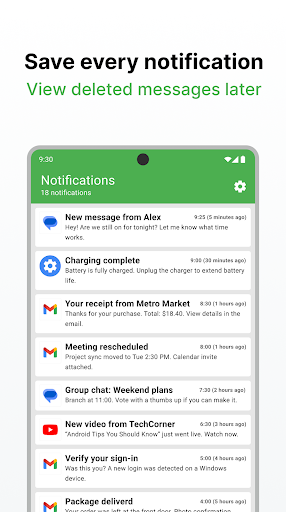

App Description
Notification history with deleted messages, private reading, and local storage.
Save your notification history and check missed alerts later.
Norg keeps new notifications on your device so you can review them when you need them. Use it as a notification history manager, read message previews with less pressure, and find deleted message notifications that were saved before they disappeared.
Save notifications automatically
Norg saves notifications as they arrive, giving you a searchable notification history for missed alerts, cleared notifications, and messages you want to check later. Search and app filters help you find the right notification faster.
Read without receipts
Preview message content from notifications before opening the original app. For supported apps, this helps you read on your own timing without marking the message as read right away.
Review deleted message notifications
If Norg saved a notification before the sender deleted the original message, you may still be able to review that notification later. Only notifications received after you install Norg can be saved.
Manage important alerts
Choose which apps stay visible, which notifications move to history, and which ones should be skipped. Keep important alerts easy to find and reduce clutter in your notification shade.
Notification content stays on your device
Your notification content and notification history are managed on your device with local storage. Notification content is not collected, helping you use Norg with more confidence when handling messages and alerts.
Key features
・Automatic notification history
・Searchable notification log
・Private message preview
・Deleted message notification review
・App filters and important alerts
・Home screen widgets
・Export / import for device changes
Free and Premium
In the free version, you can view notifications from the last 3 days. Premium unlocks access to older saved notifications, ad removal, pinned notifications, bulk read actions, and full-feature widgets.
Recommended for
・People who often miss notifications
・People who want to read messages without read receipts
・People who want to check deleted message notifications later
・People who want a cleaner, more searchable notification manager
Required permission
Norg requires notification access permission to save and organize notifications. You can manage this permission from Android settings.
Install Norg to keep a useful notification history, read messages with less pressure, and stay in control of important alerts.