ChromaFusion Launcher - Themes

ChromaFusion Launcher - Themes Summary
ChromaFusion Launcher - Themes is a mobile Android app in Personalization by lwsoftipl Apps. Released in Aug 2025 (9 months ago). It has about 95.1K+ installs and 2.6K ratings with a 4.63★ (excellent) average. Based on AppGoblin estimates, it reaches roughly 4K monthly active users . Store metadata: updated Mar 5, 2026.
Recent activity: 1.7K installs this week (7.9K over 4 weeks) showing below average growth , and 32 new ratings this week View trends →
Store info: Last updated on Google Play on Mar 5, 2026 .
4.63★
Ratings: 2.6K
Screenshots


App Description
Customize your Android with stylish themes, widgets & icon packs!
Transform your Android device's home screen with the Chroma Fusion Launcher and experience the allure of the chroma fusion theme like never before! Dive into a world of unique and customizable widgets that will elevate your smartphone experience to a whole new level.
🌌 Key Features 🌌
1. **Stunning Wallpapers**: Choose from wallpapers within the launcher. Plus, you have the freedom to apply wallpapers from your gallery to create a unique look.
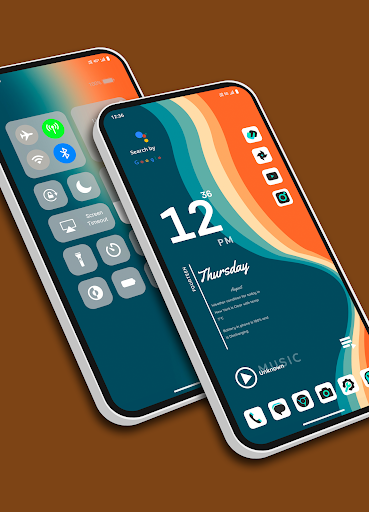
2. **Unique Themes and Widgets**: Explore 18 meticulously crafted themes, each designed with focused frame and unique wallpapers and widgets that perfectly complement your style.
3. **Icon Pack Variety**: Tailor your device's look with ease by switching between 43 unique icon packs. Customize the color and padding of select packs for a truly personalized touch.
4. **Personalized Home Screen**: Arrange your icons and widgets to create a home screen that truly reflects your personality and preferences.
5. **Effortless Folder Creation**: Create folders easily by dragging and dropping apps, customize them with a long press, and choose between large or small grid layouts for folder.
6. **Intuitive Drag and Drop**: Bring more apps to your home screen by intuitively dragging and dropping them for quick access.
7. **Versatile App List**: Enjoy the convenience of two app list formats—grid and list view—both featuring alphabetized index search and regular search options.
8. **Instant Notification Counts**: Stay on top of your notifications with a quick glance at the app icons, which display the notification count for a faster response.
9. **Versatile Widgets**: Choose from a variety of widgets, including calendar, clock, digital clock, weather, greetings, and more, with 15+ options to enhance your home screen. You can resize each and every widget, you can also apply system widgets.
10. **Customizable Weather Forecast**: Select your preferred city for weather forecasts and stay informed about the conditions that matter to you.
18. **Flexible Font Sizes**: Customize your text by choosing from three font sizes—small, medium, or large—to suit your visual preferences.
12. **App Privacy**: Maintain your privacy by hiding specific apps from the app list. Easily access hidden apps in the settings under the "Hidden Apps" section.
13. **App Lock Feature**: Keep your sensitive apps secure with our built-in app locking feature. Set up a password to safeguard your apps from unauthorized access.
14. **Control Center**: Access Control Center by swiping down on the main screen. Easily control music playback and quickly toggle various settings.
Download the Chroma Fusion Launcher now and embark on a journey of unparalleled customization, aesthetics, and functionality for your Android device. Upgrade your home screen and unlock a world of possibilities today!