JSON & CSV Converter & Viewer


JSON & CSV Converter & Viewer Summary
JSON & CSV Converter & Viewer is a ad-supported Android app in Productivity by Manyu Lab LLC.. Released in Oct 2025 (7 months ago). It has about 422+ installs Based on AppGoblin estimates, it reaches roughly 66 monthly active users and generates around $<10K monthly revenue (0% IAP / 100% ads). Store metadata: updated May 9, 2026.
Recent activity: 30 installs this week (79 over 4 weeks) showing steady growth View trends →
Store info: Last updated on Google Play on May 9, 2026 .
0★
Ratings: 0
Screenshots


App Description
Instantly view JSON/CSV as tables. Convert with one tap, even nested JSON!
JSON CSV Master is an essential data processing tool for developers, data analysts, and students. It allows you to visualize complex and hard-to-read JSON and CSV data in an intuitive table format and easily convert it to your desired format with powerful features.
Key Features
1. Clean Data Visualization
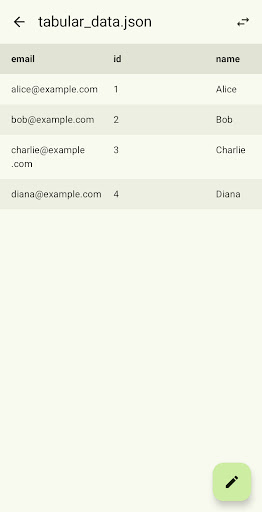
* Displays JSON arrays and CSV files in an intuitive table format, allowing you to understand the data structure at a glance.
* **Preserves JSON Key Order**: Displays columns in the exact order they appear in your JSON file.
* JSON data that is difficult to represent in a table (e.g., JSON starting with an object) can be viewed directly using the **Open in Text Editor** feature.
2. Powerful and Flexible Conversion
* JSON ↔ CSV Mutual Conversion: Convert JSON to CSV, or CSV to JSON, with just a few taps.
* Handling Nested JSON: Provides two advanced options for converting complex nested JSON structures.
* **Flatten with dots**: Flattens nested structures like {"user": {"name": "John"}} into a header connected by dots, such as user.name, representing all data as columns in the CSV.
* **Keep objects as strings**: Preserves nested JSON objects or arrays as-is in string format within their cells, maintaining the original data structure as much as possible during conversion.
3. Convenient Editing and Saving
* Both the original data (JSON/CSV) and the converted results can be opened and modified directly in the built-in **Text Editor**.
* **Prettify Support**: Offers a formatting feature to make large, single-line (minified) JSON files easy to read.
* Edited content can be saved as a new file, enhancing the efficiency of data preprocessing and management tasks.
4. Support for Various Input Methods
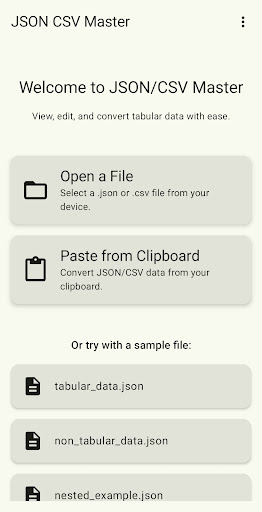
* Open File: Directly open and work with .json or .csv files stored on your device.
* Paste from Clipboard: Quickly check data by pasting JSON/CSV data copied from the web or other apps directly from the clipboard.
* Sample Data Provided: Includes various sample files to let you test the app's main features immediately.
With JSON CSV Master, you no longer have to worry about data formats. Download now and upgrade your data processing tasks!