

Tidy PDF Summary
Tidy PDF is a free, ad-supported Android app in Tools by Fika Global Apps. Released in Jul 2026 (1 month ago). Store last updated Jul 29, 2026
Tidy PDF SDKs Summary
App not yet scanned for SDKs.
0★
Ratings:
Screenshots



App Description
Browse documents, use PDF tools, and convert between images and PDFs.
Tidy PDF brings document browsing, file organization, and essential PDF tools into one clean, intuitive interface. Designed around its on-screen controls, the app lets you move seamlessly between document lists, PDF utilities, and image conversion—without digging through cluttered menus.
Home Screen & Document Views
The Home screen provides a central hub for all documents on your device. Easily filter by type—All, PDF, Word, Excel, PowerPoint, Text, and Image—using the visible tabs. Each file card clearly displays the name, date, and size, helping you identify the right item instantly.
Navigation is streamlined into three sections: All Files for your full library, Recent for quick access to just-opened items, and Bookmarks for files you’ve starred. Sorting and search controls sit at the top of the list, making it easy to manage even large collections.
Powerful PDF Actions
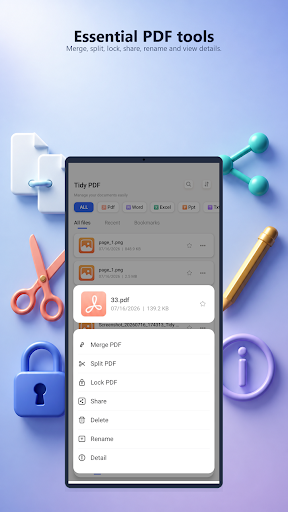
Select any PDF to reveal a focused action menu. From here, you can:
Merge PDF: Combine multiple documents into one.
Split PDF: Separate pages or extract sections.
Lock PDF: Secure sensitive files using the app’s encryption option.
Manage: Share, Rename, Delete, or view File Details—all from one place.
Seamless Image & PDF Conversion
Tidy PDF offers two distinct, easy-to-find conversion workflows:
Image to PDF: Browse image folders via the visual picker, review thumbnails, and select your photos. Use the "Select All" control for speed, then tap Next to generate your PDF.
PDF to Image: Choose a document from the clearly listed PDF library to convert its pages into high-quality images.
Clear Interface & Quick Access
The app is built for efficiency. File-type icons help you scan the list visually, while bookmark stars and three-dot menus on each row provide instant access to actions without leaving the main view. Bottom navigation keeps Home, Tools, and Settings within easy reach, ensuring the layout remains uncluttered and focused on your tasks.
Key Features at a Glance:
Centralized document browser with type filtering
Quick access to All Files, Recent, and Bookmarks
In-list search and sorting tools
One-tap access to Merge, Split, and Lock PDF
Streamlined Image-to-PDF and PDF-to-Image workflows
Direct sharing, renaming, and file detail views
Clean, card-based design with bottom navigation
Who It’s For
Tidy PDF is ideal for users seeking a straightforward utility to manage documents and handle PDF workflows. Whether you’re organizing a project, converting images for a report, securing a contract, or simply trying to find a recently edited file, Tidy PDF keeps the next step obvious and the process frustration-free.