mazec3(手書きによるカンタン日本語入力)[体験版]
![mazec3(手書きによるカンタン日本語入力)[体験版]](https://media.appgoblin.info/app-icons/com.metamoji.mazectrial/c1667eb956472b11.png)
![mazec3(手書きによるカンタン日本語入力)[体験版]](/gp_en_badge_web_generic.png)
mazec3(手書きによるカンタン日本語入力)[体験版] Summary
mazec3(手書きによるカンタン日本語入力)[体験版] is a mobile Android app in Productivity by MetaMoJi Corp.. Released in May 2013 (13 years ago). It has about 134.6K+ installs and 369 ratings with a 3.33★ (mixed) average. Based on AppGoblin estimates, it reaches roughly 424 monthly active users . Store metadata: updated Jan 6, 2026.
Recent activity: 13 installs this week (65 over 4 weeks) showing steady growth View trends →
Store info: Last updated on Google Play on Jan 6, 2026 .
3.33★
Ratings: 369
Screenshots


App Description
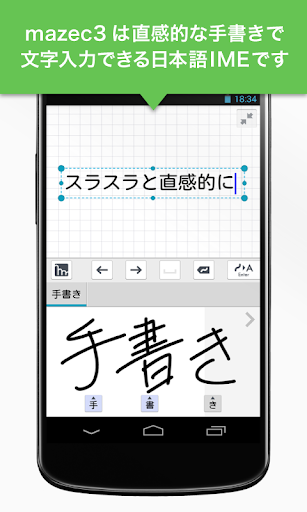
The easiest to use with a high degree of accuracy most. Handwriting input of the strongest "mazec" appeared as a single input system at last!
Write smoothly and convert quickly. Handwriting conversion "mazec3"
mazec, the pinnacle of handwriting conversion, combines "highest recognition accuracy" with "user-friendly operation for everyone," and now available as a standalone IME, "mazec3"! Try the 10-day free trial here!
As a Japanese input method (IME) for Android, you can use intuitive handwriting input in any app.
You can input Japanese smoothly in a variety of apps, and it supports input in 13 languages.
Try the easy input feature of "mazec3," which allows you to use your Android device as freely as a paper notebook and pen.
■■Features of mazec3■■
(1) Amazing recognition speed and accuracy for smooth input
Convert handwritten characters to text with unprecedented speed and accuracy.
Free yourself from the frustration of small soft keyboards and flick input, creating a comfortable input environment.
(2) Accurate mixed-script conversion even for mixed kanji and hiragana
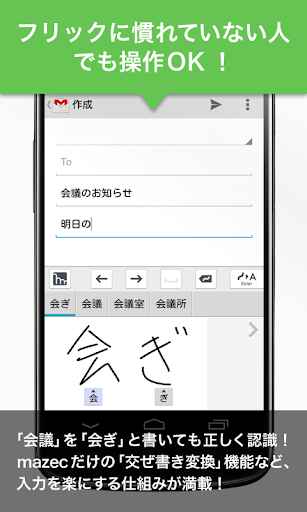
Enter difficult or unreadable kanji in hiragana. Enter "会ぎ" (meeting) and it will be recognized and converted to "会 (meeting)."
The mixed-script conversion and predictive conversion functions speed up even tedious character input.
(3) Handwriting conversion in your everyday applications!
Handwriting conversion is available in all the apps you use every day, including browser searches, email clients, and social media apps like Twitter.
(4) "Character Shape Learning" tunes character recognition to match your own character shapes
The "Handwriting Learning" and "Character Shape Registration" functions tune character recognition to match your own character shapes.
(5) Supports handwriting recognition and input in 13 languages
In addition to the existing Japanese and English, 11 new languages (French, German, Italian, Spanish, Portuguese, Dutch, Russian, Polish, Simplified Chinese, Traditional Chinese, and Korean) are now supported, for a total of 13 languages.
*Language conversion is available by purchasing additional "Language Packs" (12 products) from the Add-on Store.
(6) Don't worry if recognition fails! A variety of input assistance features make it stress-free.
Do you have to rewrite a misreading? No problem. You can correct the recognition with a single touch.
(7) Featured with alphanumeric recognition mode and support for IME switching from mazec, these features are designed with user-friendly details in mind.
■■How to Use■■
After installing "mazec3," launch it and follow the on-screen instructions to enable "mazec3 Handwriting Conversion."
The online manual can be found below.
https://product.metamoji.com/android_top/mazec3/support/help/
■■System Requirements■■
Android 10 or later
■■License Agreement■■
Please read the "License Agreement" before purchasing.
http://product.metamoji.com/android_top/mazec/licensing/
*By downloading, you agree to the terms of this license agreement.