Audio Analyzer

568.4K installs
815 ratings
7.7K monthly active users
Revenue not available
Install Trends
Weekly +6.2K
Trending
Monthly +10.9K
Trending
Audio Analyzer Summary
Audio Analyzer is a mobile Android app in Music And Audio by Sergio Gudkov. Released in Apr 2017 (8 years ago). It has about 568.4K+ installs and 815 ratings with a 4.24★ (good) average. Based on AppGoblin estimates, it reaches roughly 7.7K monthly active users . Store metadata: updated May 6, 2018.
Recent activity: 6.2K installs this week (10.9K over 4 weeks) showing exceptional growth View trends →
Store info: Last updated on Google Play on May 6, 2018 .
4.24★
Ratings: 815
Screenshots


App Description
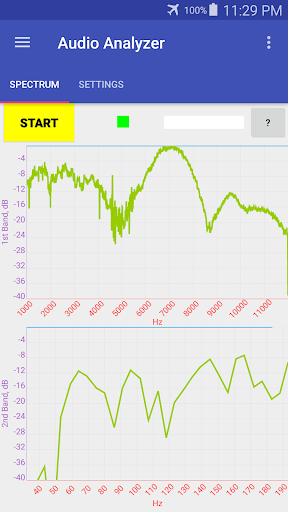
The App turns your device into an active frequency response audio analyzer.
Introduction.
Audio Analyzer is the App that allows you to perform some technical measurements of quality of the audio equipments such as amplifiers, pre-amplifiers, loudspeakers, headphones, receivers, microphones, equalizers, mixers as well as the whole audio track that including all of these audio components. Also the App is capable to measure audio parameters of separate electronic circuit components such as filters, transformers, operational amplifiers in the frequency range from 20 Hz up to 22050 Hz.
The following audio characterictics can be measured by this App: frequency response curve, dynamic range, harmonic distortion, intermodulation distortion and other non-linear distortions.
The idea of the App consists of receiving the input feedback audio signal and compare it with the output audio signal that the same Android device is generating.
The App is capable to form the output audio signal with practically ideal rectangular spectral characteristics in the user-defined frequency band in the two separated bands plus some fixed frequencies simulanuesly.
It takes less than one second to build the frequency response curve in the full audio range of 20-20000 Hz in 2.5 Hz resolution with the wideband audio signal generated by the same device.
An input and output of the signals are provided through the audio jack of the device. The microphone line is used as the input, the headphones line as the output.
Features.
Completely NO ads.
Selectable frequency resolution between 2.5 and 10 Hz.
Separate analysis in the left and right audio channels is possible.
Fine-detailed viewing the frequency response spectrum with up to 16384 spectral points by zooming and dragging.
If you have any problems or any suggestions to improve this application, please feel free to contact
by e-mail: info.sergiosoft@gmail.com
Thanks!