MKW Rabbit – Cute Watch Face


MKW Rabbit – Cute Watch Face Summary
MKW Rabbit – Cute Watch Face is a mobile Android app in Personalization by MKW(Mystic Kindle Watch). Released in Jan 2026 (4 months ago). It has about 260+ installs Based on AppGoblin estimates, it reaches roughly 27 monthly active users . Store metadata: updated May 8, 2026.
Recent activity: 19 installs this week (47 over 4 weeks) showing above average growth View trends →
Store info: Last updated on Google Play on May 8, 2026 .
0★
Ratings: 0
Screenshots


App Description
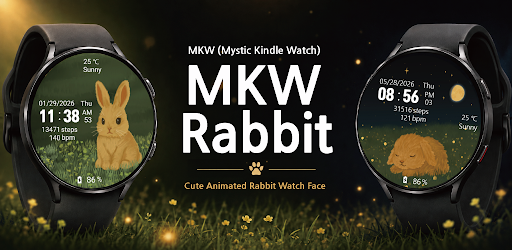
MKW digital watch face for Wear OS and Galaxy Watch (cute animated rabbit)
MKW Digital Watch Face – Cute Design for Wear OS
Important Notice
This watch face is supported only on Samsung Galaxy Watch devices running One UI 6.0 or higher.
This app is designed exclusively for smartwatches.
Users without a compatible smartwatch will not be able to use this watch face after purchase.
Watch Face Features
• Cute digital design – An adorable rabbit interface that changes between day and night
• Moon phase display – Accurately visualizes the current lunar phase
• Step counter – Tracks your daily steps
• Heart rate monitor – Displays heart rate data measured by the watch
• Battery status – Shows the remaining battery level of the watch
• Weather – Displays current weather conditions
• Temperature – Shows the current temperature
MKW Installation Guide
The “MKW Installation Guide” app helps you download and install watch faces on Wear OS devices.
MKW products include a smartphone companion app to assist with installation.
The “MKW Installation Guide” app is intended solely to support the download and installation of Wear OS watch faces.
Notes
• Heart rate information is displayed based on data provided by the watch’s built-in heart rate measurement app.
Community & Support
• Blog: https://excing4860.tistory.com/
• Email: excing4860@naver.com