Barcode Scanner - Price Finder


Barcode Scanner - Price Finder Summary
Barcode Scanner - Price Finder is a free, with in-app purchases Android app in Tools by Essential Labs. Released in Apr 2021 (5 years ago). It has about 5.7M+ installs and 72K ratings with a 4.71★ (excellent) average. Based on AppGoblin estimates, it reaches roughly 164K monthly active users and generates around $10K+ monthly revenue (100% IAP / 0% ads). Store last updated Jun 30, 2026
Recent activity: 13K installs this week (66K over 4 weeks) showing strong growth , and 248 new ratings this week View trends →
Barcode Scanner - Price Finder SDKs Summary
App not yet scanned for SDKs.
4.71★
Ratings: 72K
Screenshots



App Description
Lightweight and fast Barcode / QR Code Scanner, with built-in price comparison.
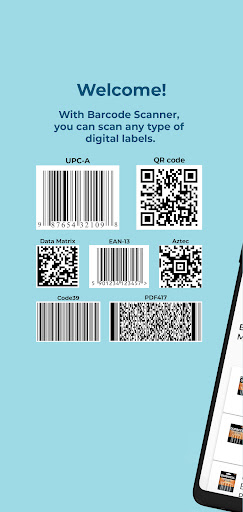
Barcode Scanner - Price Finder is an app that scans all formats of digital codes, including barcodes, QR codes, and more.
When you scan a product code in store, Price Finder will show the best online prices so you will never overpay again!
Code Scanner can also scan coupon codes, inventory codes, book ISBNs, URLs, Wi-Fi access codes, and information signs on landmarks and in parks, as well as any other digital codes, both 1D and 2D.
App Features
- Barcode Scanner/Barcode Reader
- QR Code Scanner/Reader
- Works just as well as dedicated inventory scanners at store checkouts
- Barcode Scanner can be used in any orientation - sideways or upside down is not a problem
- QR Code Scanner utilizes the fastest Android API
- For a product, Barcode Scanner gives detailed information, pictures, and the best online prices - if the product is sold online.
- Scans are saved in history
- You can share the barcode via text/email or open it in a browser
- Smart processing of QR information signs and URLs
In addition, the premium features include:
- QR Code generator - you can create and save as an image any digital information such as your email/contact information or your Wi-Fi access point for guests
- Complete removal of ads
- Unlimited history storage
- Favorites
- Dark theme
Usage
1. Click on the new scan button. Barcode Scanner mode will activate
2. Point your camera at the barcode so that it is visible in the app viewfinder
3. Barcode Scanner will recognize and scan the code as soon as the camera resolution allows. If necessary, adjust the view until the scan completes.
4. QR Code Scanner is very fast - some users report that as soon as part of the bar code is visible in the viewfinder, it gets scanned, which can result in an incomplete code being scanned. In such cases, we recommend starting with your phone sufficiently far from the code and then move closer if necessary.
5. Barcode Scanner / Price Finder will automatically detect the type of barcode / QR Code and display the information accordingly. Types include product barcodes, ISBNs, URLs, and many more.
6. If a product barcode is detected, the app will display detailed shopping information with links to online stores.
Supported code types
- Linear (one-dimentional): UPC-A, UPC-E, EAN-13, Code39, Code93, Codabar, EAN 8, GS1-128, ISBN, ITF, othe