GPS Photo & Video Tagger

GPS Photo & Video Tagger Summary
GPS Photo & Video Tagger is a mobile Android app in Maps And Navigation by Modish.org. Released in Sep 2023 (2 years ago). It has about 4.6K+ installs Based on AppGoblin estimates, it reaches roughly 404 monthly active users . Store metadata: updated Oct 31, 2025.
Recent activity: 112 installs this week (346 over 4 weeks) showing exceptional growth View trends →
Store info: Last updated on Google Play on Oct 31, 2025 .
0★
Ratings: 0
Screenshots


App Description
Easily add GPS location to photos & videos Auto manual geotagging, EXIF editing
Easily add GPS location to your photos & videos! With GeoTag My Media, you can tag your media with real-time GPS coordinates, addresses, and maps, making it easier to organize, share, and revisit your favorite memories. Perfect for travelers, photographers, vloggers, and professionals who need accurate geotagging.
Key Features
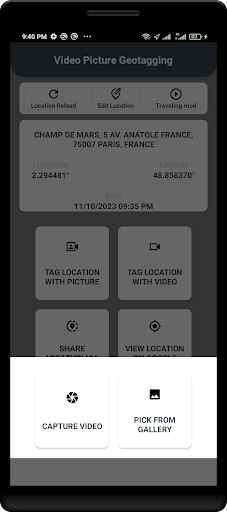
✅ Auto Geotagging – Add GPS coordinates & location data to photos and videos automatically.
✅ Manual Geotagging – Edit or add custom locations to media files.
✅ View on Map – See where your media was captured on an interactive map.
✅ Batch Processing – Tag multiple photos/videos at once.
✅ Metadata Editing – Modify EXIF & GPS data for better media organization.
✅ Share with Location – Export and share geotagged media with accurate location stamps.
✅ Offline Support – Add location details even when you're not connected to the internet.
Why Use GeoTag My Media?
📌 For Travelers & Bloggers – Keep track of all your trip locations effortlessly.
📌 For Photographers – Organize & archive media with precise location data.
📌 For Journalists & Professionals – Ensure accurate location tagging for documentation.
📌 For Social Media Sharing – Share your adventures with location tags on Instagram, Facebook, etc.
How It Works?
1️⃣ Capture or select a photo/video from your gallery.
2️⃣ Let the app auto-detect GPS coordinates or manually select a location.
3️⃣ Save the geotagged media with updated location metadata.
4️⃣ View on the map or share with friends instantly!