WiFi Mouse


WiFi Mouse Summary
WiFi Mouse is a free, ad-supported, with in-app purchases Android app in Tools by WiFi Mouse. Released in Jul 2014 (12 years ago). It has about 14.2M+ installs and 89K ratings with a 3.36★ (mixed) average. Based on AppGoblin estimates, it reaches roughly 897K monthly active users and generates around $50K+ monthly revenue (27% IAP / 73% ads). Store last updated Sep 12, 2026
Recent activity: 2.1K installs this week (8.7K over 4 weeks) showing declining growth , and 3.00 new ratings this week View trends →
SDK intelligence: AppGoblin detected 6 development tools(e.g. Google), 1 ad networks, 1 mediation,and 1 analytics: product integrated into WiFi Mouse. View full SDK list →
WiFi Mouse SDKs Summary
WiFi Mouse was last scanned for SDKs on 2025-04-07. Below is the overview of third-party companies detected in the app. The full list of SDKs, permissions and unknowns is available here.
 Google
 Square
 Kotlin
 AdMob
AdMob Firebase
3.36★
Ratings: 89K
Screenshots



App Description
Wireless mouse, keyboard, barcode scanner & AI tools for PC/Mac control
🚀 Control, type, scan and transfer — from your phone to your PC.
Transform your phone into a powerful wireless mouse, keyboard, and trackpad. Control your Windows PC, Mac, or Linux computer effortlessly via WiFi or Internet. Experience the next generation of productivity with AI-powered tools, Remote Desktop, and our new Integrated Barcode Scanner!
🖱️ PRECISION WIRELESS CONTROL (Local WiFi) Forget physical dongles! Use your phone as a high-speed wireless mouse and trackpad.
• Air Mouse: Control cursor with phone movements (Gyroscope) (Pro)
• Low Latency: Optimized for smooth clicking and scrolling via TCP/UDP.
• Full Keyboard: Support for shortcuts and function keys.
• Voice-to-Text: Dictate on your phone and text appears on your PC.
📁 FILE EXPLORER & QUICK BROWSER Manage your computer's content and navigate the web without a mouse.
• File Manager: Browse, open, and manage PC/Mac files directly from your phone.
• Smart Browser Control: Open URLs, refresh pages, switch tabs, and navigate history (Back/Forward) with one tap.
• App Launcher: Start your favorite desktop programs instantly.
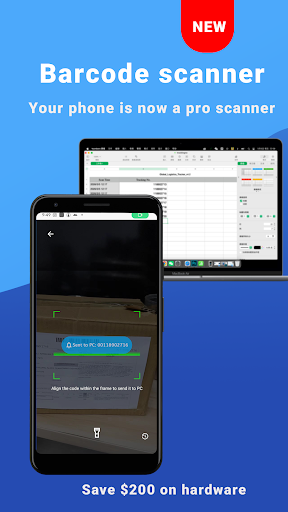
📦 SMART SCANNER TO PC Turn your phone into a professional Wireless Barcode Scanner.
• Instant Beam: Scan QR codes and Barcodes (ITF-14, EAN, etc.) directly to PC.
• Scan History: Access and resend your last 50 scan records instantly.
• Efficiency: Perfect for rapid data entry, inventory, and logistics.
🎮 GAME PAD & MEDIA MASTER
• Game Pad Mode: Use your phone as a controller for PC games (Roblox, etc.).
• Media Remote: Control Spotify, VLC, YouTube, Netflix, and more.
• Presentation Pro: Navigate PowerPoint and Keynote slides from your palm.
• TV Remote: Control TVs via IR Blaster (on supported hardware).
🌐 CLOUD AI COMMANDER (Anywhere via Internet) Bridge your phone and computer globally with powerful cloud features:
• Cross-Device Clipboard: Copy on phone, paste on PC instantly via cloud.
• AI Assistant: Use AI to Translate, Summarize, or Polish text on your PC.
• Global Power Control: Shutdown, Restart, or Sleep from anywhere.
🖥️ REMOTE DESKTOP
• Screen Mirroring: View and control your PC screen in real-time on your phone.
• Full Access: Interact with your desktop as if you were sitting right in front of it.
✅ QUICK SETUP
1. Download Mouse Server (Windows/Mac/Linux) at:
https://wifimouse.necta.us
2. Install & Run. (Important: Allow "Mouse Server" through your Firewall).
3. Connect via the same WiFi or log in for Internet features.
🌐 GLOBAL SUPPORT
• Multilingual: Switch interface languages via the dedicated menu.
• Universal: Fully compatible with Windows, macOS, and Linux.
Join millions of users! Download WiFi Mouse NOW and turn your phone into the ultimate AI-powered control hub!