Back Seat Navigator


Back Seat Navigator Summary
Back Seat Navigator is a ad-supported, with in-app purchases Android app in Maps And Navigation by Byzantine Apps LLC. Released in Aug 2018 (7 years ago). It has about 164.5K+ installs and 614 ratings with a 3.20★ (mixed) average. Based on AppGoblin estimates, it reaches roughly 23.2K monthly active users and generates around $<10K monthly revenue (29% IAP / 71% ads). Store metadata: updated Jun 4, 2026.
Recent activity: 155 installs this week (504 over 4 weeks) showing steady growth View trends →
Advertising: AppGoblin detected 1.00 monetized ad creatives shown inside the app.
Data tracking: SDKs and third-party integrations were last analyzed on Mar 26, 2026. The app's network data flows (API traffic to/from the app and its SDKs) were last crawled on Nov 14, 2025.
Store info: Last updated on Google Play on Jun 4, 2026 .
SDKs, Trackers & Permissions
Back Seat Navigator was last scanned for SDKs 2026-03-26. Below is the overview of third party companies detected in the app. The full list of raw SDKs, app permissions and unknown SDKs is available here.
AppGoblin saw Back Seat Navigator uses 7 Development Tools
 Square
 Kotlin
 JetBrains
 Google
AppGoblin saw Back Seat Navigator uses 9 Ad Networks
 PubNative
 Digital Turbine
 AppLovin
AppGoblin saw Back Seat Navigator uses 1 Analytics: Product
 Firebase
AppGoblin saw Back Seat Navigator uses 2 Mediation
 AdMob
AdMobAppGoblin saw Back Seat Navigator uses 2 Business Tools
 MapBox
 ConsentManager
App Details
App Store
Ads & App-Ads.txt
AppGoblin SDK Scans
3.2★
Ratings: 614
Screenshots



App Description
If you want a navigation app that complains, this may be the app for you...
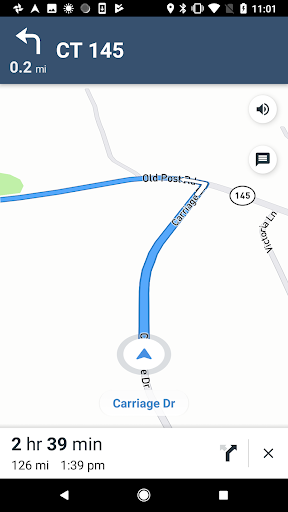
Are you a glutton for punishment? Finally, there is an Android navigation app that will curse you out while you drive, make fun of you for missing turns, and just generally act like a complete jerk. Back Seat Navigator harnesses advanced Mapbox technology to help you get where you need to go...even if it is making fun of you the whole way. Is this the most obnoxious navigation app ever? You be the judge...
BSNavigator features:
- Accurate turn-by-turn directions from Mapbox.
- Selectable navigation modes (Driving (Avoid Traffic), Driving, Walking, Cycling).
- Selectable profanity settings (On, Some, None).*
- Switchable insult settings (On, Off).**
- Night and Day modes.
- Buttloads of obnoxious directions, insults, and rerouting instructions.
- Ability to select routes that avoid tolls.
- Ability to automatically change units based on the device's locale.
Info about BSNavigator Location Permissions:
- Navigation apps require access to the device's foreground location. Without the location permission, they can't function properly or provide accurate turn-by-turn instructions.
- As soon as the app is opened and a subscription is enabled, you will be asked to grant the app foreground and background location permissions. These permissions can be changed at any time in the device Settings.
- BSNavigator will operate without the background location permission, but users will have to keep the app open in order to receive accurate turn-by-turn instructions.
- If you are interested in using the app while it's closed, you will have to grant the app access to the device's background location permissions. You can disable background location permissions at any time in the device Settings and the app will still function normally while it's open.
Info about BSNavigator Subscriptions:
- Payment will be changed to your Google Play account once you confirm the subscription.
- The Month and Year subscriptions allow you unlimited access to the app for the period of the subscription. These options remove all ads and allow for unlimited drives/routes during the period of the subscription.
- The Subscription options automatically renew unless auto-renew is turned off or the subscription is cancelled before the end of the current subscription period.
- You can cancel your subscription at any time in the subscriptions section on Google Play. When you cancel your subscription, you’ll lose access to the subscription at the end of the current billing period.
- You will not receive a prorated refund if you cancel a subscription in the middle of a billing period. Instead, you will continue to receive the subscription content for the remainder of the current billing period, regardless of the cancellation date.
- You might find a payment authorization on your payment method up to 24-hours before the renewal date but you’ll only be charged on the renewal date. To remove the payment authorization, cancel the subscription before the renewal date.
- Automatic renewals will cost the same price you were originally charged for the subscription.
- You can manage your subscriptions and turn off auto-renewal by going to the Subscriptions section on Google Play after subscribing. There is also a link to manage subscriptions in the BSNavigator Purchases page located in the upper right drop down menu in the app.
- You can also add a second payment method to your Google Play account to help prevent interruptions to your subscription service in case your primary payment method expires or fails.
- Once a subscription expires, ads will be shown again in the app.
- Read the app Terms of Use / Privacy Policy for more information.
Privacy Policy: https://byzantineapps.io/privacy
Terms of Use: https://byzantineapps.io/terms/
*The BSNavigator profanity setting defaults to "On." You can turn the level down at any time in the App Settings.
**The BSNavigator insult setting defaults to "Off." You can turn it on at any time in the App Settings.