Noto | Minimal Note-Taking App


Noto | Minimal Note-Taking App Summary
Noto | Minimal Note-Taking App is a mobile Android app in Productivity by Ali Albaali. Released in Jun 2020 (5 years ago). It has about 67K+ installs and 703 ratings with a 4.26★ (good) average. Based on AppGoblin estimates, it reaches roughly 3.4K monthly active users . Store metadata: updated Sep 25, 2023.
Recent activity: 149 installs this week (578 over 4 weeks) showing steady growth View trends →
Store info: Last updated on Google Play on Sep 25, 2023 .
4.26★
Ratings: 703
Screenshots

App Description
Noto is a minimal open-source note-taking application.
Ad-free
We all hate ads. Well, Noto doesn't have any, and it never will. Enjoy the full experience without any ads and free of cost.
Open source
Noto is an open-source application. You can view its source code on GitHub at anytime using this link https://www.github.com/alialbaali/Noto
Privacy
All your notes and folders are stored locally on your device, and they will never leave it.
Minimal and modern design
With its modern and simplistic design, Noto makes it easier to navigate and look things up.
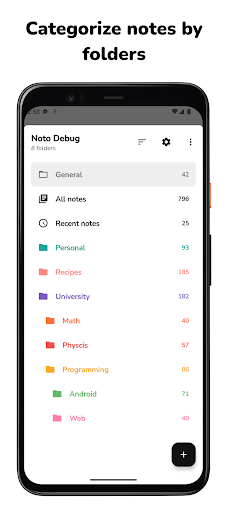
Folders
Use folders to group different types of notes. Customize each folder with various names and colors, so you can easily find them and organize your notes.
Folders vault
Want to keep some stuff private? You can add as many folders as you want to the vault and lock them with passcode, fingerprint, or facial recognition.
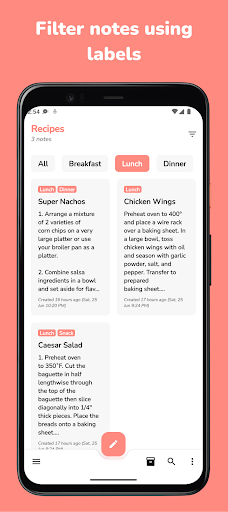
Labels
Each folder has its own set of labels, and you can use them to filter your notes in the anyway you want. Including, inclusive or exclusive filtering.
Pinned folders & notes
You can pin folders & notes to stay at the top, without the need to search for it.
Folders & Notes archive
Done with a folder or a note but you don't want to delete them? Just archive it. There is folders archive. In addition to, each folder has its own archive where you can keep your notes just in case you need them at a later time.
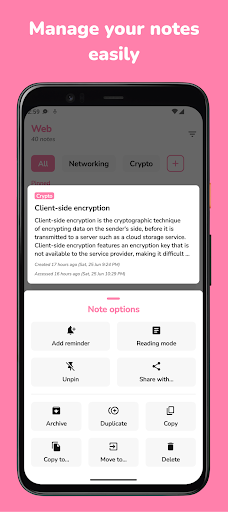
Duplicate/Copy/Move notes
Noto supports duplicating, moving, and copying notes across different folders.
Auto save
You don't need to worry about saving your notes constantly. Noto automatically saves your notes immediately while you're typing.
Notes word-count
Noto keeps track of the number of written words in each note.
Light/Dark/Black/System themes
Do you want to check your notes at night? No problem! Noto supports auto dark mode by default. You can also keep Noto’s theme always light, dark, or black depending on your needs.
List and grid layout modes
You can customize folders’ and notes’ layou