OBDocker - OBD2 Car Scanner

OBDocker - OBD2 Car Scanner Summary
OBDocker - OBD2 Car Scanner is a with in-app purchases Android app in Auto And Vehicles by Motorsure INC.. Released in Dec 2023 (2 years ago). It has about 1.9M+ installs and 37.6K ratings with a 4.52★ (excellent) average. Based on AppGoblin estimates, it reaches roughly 111.6K monthly active users and generates around $<10K monthly revenue (100% IAP / 0% ads). Store metadata: updated Aug 26, 2025, version 735.
Recent activity: 8.7K installs this week (37.7K over 4 weeks) showing steady growth , and 213 new ratings this week View trends →
Data tracking: SDKs and third-party integrations were last analyzed on Jun 2, 2026. The app's network data flows (API traffic to/from the app and its SDKs) were last crawled on Jun 18, 2025.
Store info: Last updated on Google Play on Aug 26, 2025 (version 735).
SDKs, Trackers & Permissions
OBDocker - OBD2 Car Scanner was last scanned for SDKs 2026-06-02. Below is the overview of third party companies detected in the app. The full list of raw SDKs, app permissions and unknown SDKs is available here.
AppGoblin saw OBDocker - OBD2 Car Scanner uses 9 Development Tools
 Google
 JetBrains IntelliJ
 Square
AppGoblin saw OBDocker - OBD2 Car Scanner uses 1 Analytics: Product
 Firebase
AppGoblin saw OBDocker - OBD2 Car Scanner uses 1 Analytics: Attribution
 AppsFlyer
AppGoblin saw OBDocker - OBD2 Car Scanner uses 2 Ad Networks
 Facebook
App Details
App Store
Ads & App-Ads.txt
AppGoblin SDK Scans
4.52★
Ratings: 37.6K
Screenshots
App Description
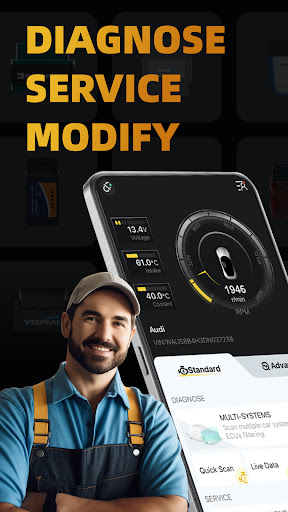
Ultimate OBD2 Car Scanner: Diagnostics, Service and Modification Tool
Crafted with user-friendliness and power in mind, OBDocker is a professional OBD2 car scanner app that empowers you to diagnose, service, and customize your vehicles with ease and precision.
*************************
KEY FEATURES
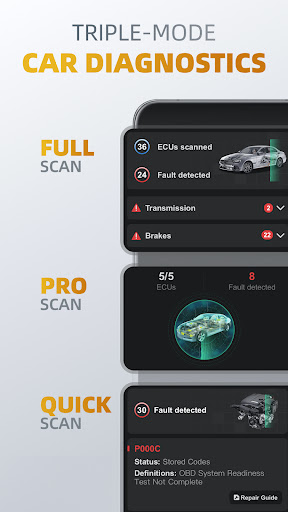
1️⃣Triple-Mode Diagnostics
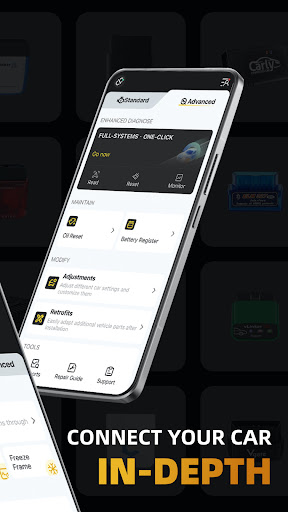
○ Full-Systems Diagnose: One-Click OE-Level full-systems diagnostics.
○ Multi-Systems Diagnose: Scan multiple systems through ECUs filtering such as TMS, SRS, ABS, TCM, BCM and many more.
○ Quick Scan: Swiftly read and clear engine fault codes to maintain a smooth drive.
2️⃣Triple-Mode Live Data
○ Health Monitor: Track every systems performance by diving into real-time parameters.
○ Engine Monitor: Monitor your engine's performance.
○ Dash Monitor: Visualize your vehicle's metrics in real-time.
3️⃣Full-Cycle Service
○ Emissions Pre-check: Test your emissions and pass with confidence before your official check.
○ Control Tests: Perform EVAP Leak Test, DPF and Inducement System Reinitialization.
○ Oil Reset: Easily reset oil change reminders and maintenance lights to keep your car's records up to date.
○ Battery Registration: Register the battery replacement to notify the battery management.
4️⃣On-Click Modification
○ Adjustments: Adjust different car settings and customize them by one-click.
○ Retrofits: Easily adapt additional vehicle parts after installation.
*************************
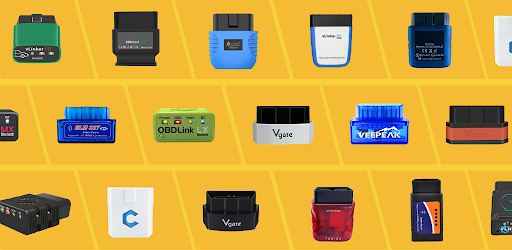
OBD ADAPTERS
OBDocker requires a compatible OBD adapter to work. We recommend the following for the best experience:
- High Performance: Vlinker Series, OBDLink Series, MotorSure OBD Tool, Carista EVO.
- Middle Performance: All genuine adapters compatible with ELM327 / ELM329, including Veepeak Series, Vgate iCar Series, UniCarScan, NEXAS, Carista, Rodoil ScanX, and more.
- Low Performance (Not Recommended): Cheep Chinese clones ELM.
*************************
SUPPORTED CARS
OBDocker is compatible with a wide range of vehicles, covering both standard and advanced modes:
- Standard Mode: Universal compatibility with OBD2 / OBD-II or EOBD vehicles worldwide.
- Advanced Mode: Toyota, Lexus, Nissan, infiniti, Honda, Acura, Hyundai, Kia, Volkswagen, Audi, Skoda, SEAT, Mercedes-Benz, BMW, Mini, Porsche, Ford, Lincoln, Chevrolet, Cadillac, GMC, Buick. And still working really hard to add more…
*************************
PLANS: