Photo Resizer & Compressor


Photo Resizer & Compressor Summary
Photo Resizer & Compressor is a mobile Android app in Tools by Mansu Tech. Released in Jan 2026 (3 months ago). Store metadata: updated Feb 25, 2026.
Store info: Last updated on Google Play on Feb 25, 2026 .
0★
Ratings:
Screenshots


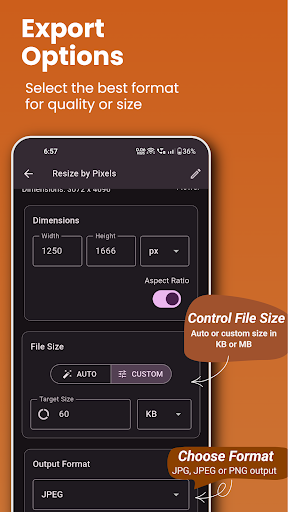
App Description
Resize, compress, convert images and adjust DPI—fast, easy, and accurate.
Photo Resizer – Resize, Compress & Change DPI
Photo Resizer is a simple yet powerful image utility that helps you resize, compress, convert image formats, and change DPI easily—without complicated tools or quality loss. Perfect for students, professionals, designers, and anyone who works with images regularly.
Whether you need to reduce file size for sharing, adjust image dimensions, prepare images for printing, or convert formats, Photo Resizer gets the job done in just a few taps.
🔧 KEY FEATURES
• Resize Images
Change image dimensions using pixels, cm, mm, or inches while maintaining aspect ratio.
• Compress Images
Reduce image file size efficiently without noticeable quality loss.
• Change DPI
View original DPI and set a target DPI for print or document requirements.
• Convert Image Formats
Convert images between popular formats like JPG, PNG, and WEBP.
• Increase or Target File Size
Adjust image file size for specific upload or document needs.
• Batch Processing (Pro)
Process up to 12 images at once with Pro upgrade.
• Ad-Free Experience (Pro)
Remove ads completely with Pro version.
• Quick Preview
Preview images before and after processing.
• Easy Sharing
Share processed images directly from the app.
⭐ Pro Version Benefits
Upgrade to Pro to unlock:
✔ Multiple image processing (up to 12 images)
✔ Ad-free experience
✔ Faster and smoother workflow
One-time purchase. No subscriptions.
📂 Supported Use Cases
• Online form submissions
• Printing & documentation
• Social media uploads
• Email & messaging apps
• Website image optimization
• Academic and professional work
🔒 Privacy First
Photo Resizer respects your privacy.
• Images are processed locally on your device
• No images are uploaded to external servers
• No personal data is collected or shared
📱 Simple & Lightweight
• Clean and easy-to-use interface
• Fast performance
• Works offline
• Optimized for phones and tablets
Download Photo Resizer today and manage your images smarter, faster, and easier.